
Complete Business Management Software
Business Manager Enterprise (BME) is all-in-one business management software that brings CRM, ERP, MRP, sales, purchasing, inventory, projects, HR, service, document management and multi-currency accounting together in one browser-based platform.
Small business or large enterprise, everything your business needs, unified into one scalable platform, at a surprisingly low cost.
Growth
+28% Monthly
Secure
Enterprise Grade
What is business management software?
Business management software is an integrated system that helps run core business functions such as sales, customers, inventory, purchasing, projects, finance and reporting from one shared database, so every team works from the same live data instead of separate, disconnected applications.
- CRM & Sales
- Inventory
- Purchasing
- Projects
- HR
- Accounting
BUSINESS SOFTWARE MADE SIMPLE
Business Manager Enterprise: Your All-in-One Solution for Sustainable Business Success.
Stop juggling multiple software systems and simplify your operations with Business Manager Enterprise (BME), a comprehensive Business Management System (BMS). Whether you're a growing business or a multinational enterprise, BME provides a unified platform that integrates CRM, ERP, MRP, Project Management, Sales Processing, Supply Chain, Warehouse Management, HR, Service Desk, Asset Management, and fully integrated, multi-currency Accounting, plus QA, NCR and comprehensive auditing.
How can BME reduce business software costs?
BME delivers comprehensive business management without the inflated costs often associated with many competing enterprise systems. With a full suite of integrated modules included as standard, it provides a significantly more budget-friendly alternative to solutions that require costly add-ons and higher ongoing fees. In addition, perpetual licensing may offer you balance-sheet and financial benefits.
How easy is BME to use?
BME is built with a single common interface, so users are seldom more than two clicks away from starting key processes such as quotations, sales orders, and invoices. Less time navigating means faster adoption, lower support costs, and greater productivity, giving you a crucial competitive advantage. Customizable user interfaces and user-defined reports make BME even easier to adapt, navigate, and use across the business.
Built on Proven Expertise
BME builds on more than 25 years of award-winning business software development. Combining that proven foundation with MariaDB and modern web technologies, it delivers performance, flexibility, and functional depth in a fully browser-based platform. Its scalable architecture also supports growth from smaller deployments through to larger, high-availability enterprise environments.
How does BME use AI? — BME AI Pulse
BME Pulse gives you AI insight without making AI part of your core transaction engine. BME gathers the data, performs the calculations, and creates a verified result set before anything is sent to your chosen AI provider. The AI explains the numbers; BME guarantees them. Your ERP remains the single source of truth, your live data is never altered by AI, and usage is controlled through your own API key. If the AI provider is unavailable, BME continues working normally. It is AI on your terms — useful, controlled, auditable, and safe by design.
See for yourself! Easy to Use… Two Clicks and you're there…
Watch how BME simplifies your workflow and boosts productivity
Watch a Short VideoWhy choose BME as your business management software?
BME brings core business functions together in one platform, giving companies a single source of truth across sales, purchasing, stock, projects, service and finance. With standard-inclusive modules, concurrent licensing and perpetual licence options, BME can also reduce long-term software costs and dependency on multiple separate systems.
What is perpetual licensing and why does it matter?
Perpetual licensing means you own the software outright instead of renting it, avoiding open-ended dependency on rising monthly or annual subscription charges. It may also provide the benefit of a capital investment with potential balance-sheet value, and where upfront cost is a concern, licences can often be funded through a lease or loan with predictable monthly payments.
What is concurrent licensing?
Concurrent licensing means businesses pay for actual simultaneous system usage rather than being charged for every individual who might need access. Named-user models can inflate costs unnecessarily by forcing companies to license users who are not all in the system at the same time. Concurrent licensing is a more efficient and commercially sensible approach, helping reduce software spend while providing greater flexibility as teams, roles, and working patterns evolve.
How does BME create a single source of truth?
BME creates a single source of truth by bringing core business functions together in one integrated platform. Instead of relying on disconnected systems, duplicated records, and manual rekeying between departments, businesses can work from the same live data across sales, purchasing, stock, projects, operations, and finance. This improves visibility, reduces errors, and supports faster, more confident decision-making. With everyone working from the same up-to-date information, departments stay better aligned and the business gains greater control over day-to-day operations.
Two-Click Simplicity
BME is designed around a single common interface. Without switching between applications or navigating complex menus, users are typically no more than two clicks away from the actions they need to perform. From quotations and sales orders to purchasing, invoicing, stock, and projects, the same consistent experience applies throughout. When software takes longer to learn and routine processes take longer to execute, efficiency declines and operational costs increase. BME is built to reduce that friction, helping users become productive faster and work more effectively every day.
Can BME be customised for different roles?
BME can be tailored for different roles across the business, with dashboards, reports, views, and screens configured to give each user the information most relevant to their role. Custom fields can also be added, allowing the platform to reflect more specific business requirements. This improves usability, supports efficiency, and helps teams work more effectively, while retaining the consistency, visibility, and control of a single integrated platform. Dashboards can also be created and shared with other users, enabling individuals with stronger presentation or analytical skills to help develop more effective views for wider use across the business — all without vendor involvement.
How scalable is the BME platform?
BME builds on more than 25 years of award-winning business software development, refined over many years through direct customer input. Combining that proven foundation with MariaDB and modern web technologies, it delivers a fully browser-based platform with the performance, flexibility, and functional depth to support everything from a single-server installation to larger high-availability multi-server enterprise environments. This gives businesses the reassurance of a proven platform that can start simply, grow confidently, and continue to meet more demanding operational requirements over time.
BME — we work WITH you to build software that works FOR you.
What does BME business management software include?
BME includes a wide range of integrated modules, including dashboards, CRM, quotations, sales orders, inventory, purchase orders, projects, jobs and field service, suppliers, service contracts and asset management, document management, accounting, system security, audit trail and quality assurance — all sharing one database.
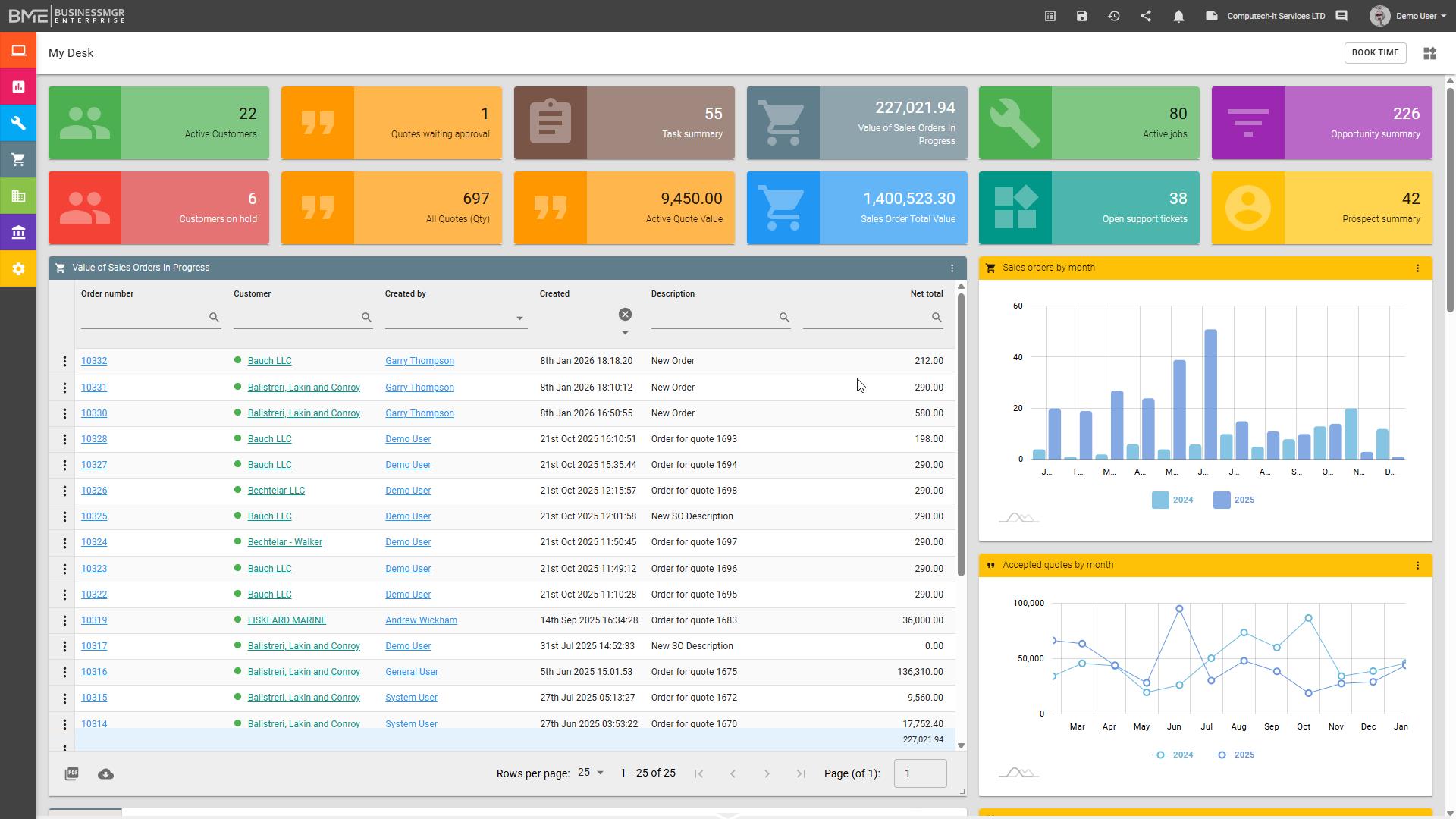
The landing page provides each user with a clear and relevant starting point, while the system navigation menu on the left remains consistently available across the platform for quick and familiar access. From this single common interface, users can move directly into the functions they need without switching between applications or navigating complex menu structures.
The landing page provides each user with a clear and relevant starting point, while the system navigation menu on the left remains consistently available across the platform for quick and familiar access. From this single common interface, users can move directly into the functions they need without switching between applications or navigating complex menu structures.
Whereas many other vendor systems rely on third-party plugins for detailed reporting, BME allows users to create their own widgets, including charts, graphs, lists, and KPIs, using data from across the platform, subject to access privileges, to highlight the information, actions, and priorities most relevant to each individual role, or department.
Lists can be searched, filtered, and summarised, then exported as CSV or printed as PDF output based on the found set, with summary calculations and record counts included. Dashboards can also be tailored and shared with other users, allowing those with particular skill in creating these views to support wider use across the business.
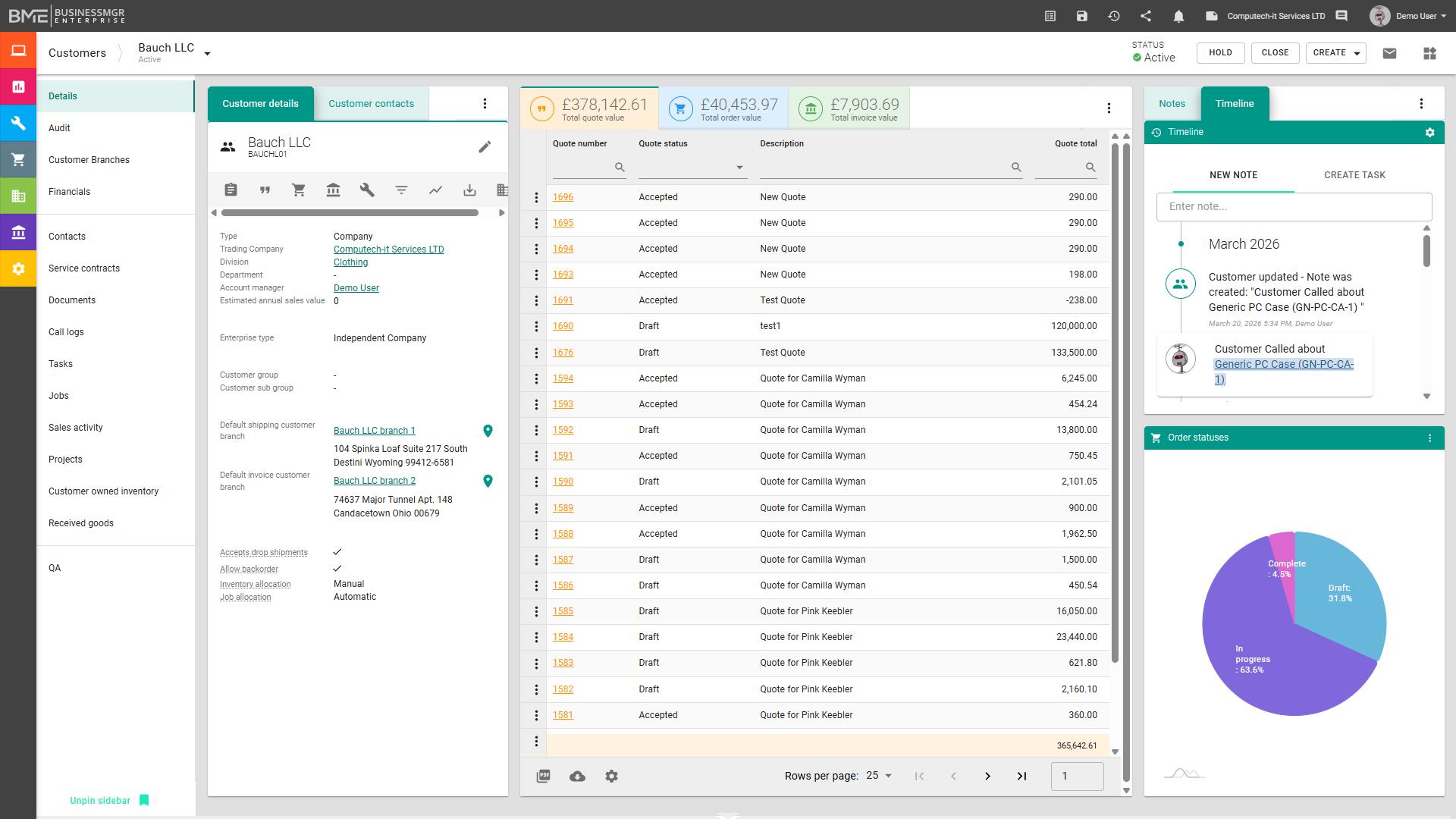
BME provides a fully integrated CRM and customer management environment, giving teams a clear view of prospects, customers, contacts, communications, opportunities, quotations, and ongoing activity in one place. Multiple customisable sales pipelines allow businesses to reflect different sales processes and workflows, rather than being forced into a single fixed approach.
BME provides a fully integrated CRM and customer management environment, giving teams a clear view of prospects, customers, contacts, communications, opportunities, quotations, and ongoing activity in one place. Multiple customisable sales pipelines allow businesses to reflect different sales processes and workflows, rather than being forced into a single fixed approach.
Customer-specific pricing and discounts can be managed within the platform, while tiered discount groups provide a structured way to apply broader pricing policies across selected customers. Customer-owned product can also be stored and tracked within inventory, supporting third-party logistics (3PL) and other customer-specific stockholding requirements.
Because this information sits within the wider platform, users can move seamlessly from relationship management into sales orders, projects, support, and finance without re-entering data or relying on disconnected systems. A timeline is also available across every module, helping users see activity, communication, and progress in context. This improves visibility, supports better customer service, and helps build stronger commercial control across the customer lifecycle.
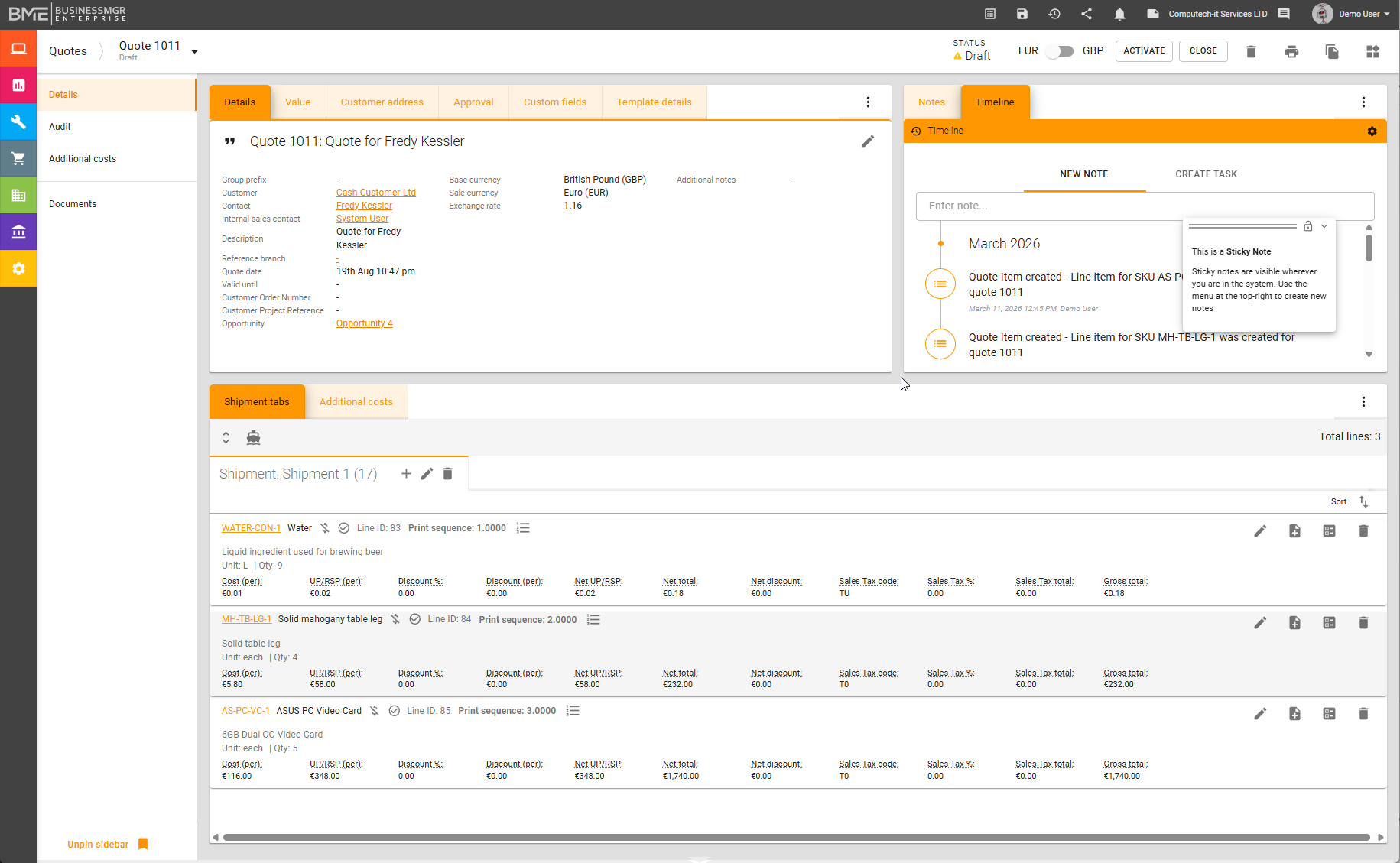
BME provides a powerful quotation environment designed to help businesses create detailed, professional, and commercially controlled proposals. Quotations can include graphics, extended custom descriptions for individual line items, template-based formats, and overall discounts, allowing each proposal to be tailored to the opportunity while maintaining consistency and presentation quality.
BME provides a powerful quotation environment designed to help businesses create detailed, professional, and commercially controlled proposals. Quotations can include graphics, extended custom descriptions for individual line items, template-based formats, and overall discounts, allowing each proposal to be tailored to the opportunity while maintaining consistency and presentation quality.
Multi-currency support allows quotations to be created in currencies other than the base currency and switched between the two as required, while discount controls help ensure sale prices do not fall below defined minimum values.
Because quotations sit within the wider platform, they remain linked to the customer, inventory, and next stages of the commercial process, allowing progression into sales orders or, where appropriate, direct invoicing. Quotations for multiple shipments can also be created, and supporting documents can be stored against them to keep all relevant information connected in one place.
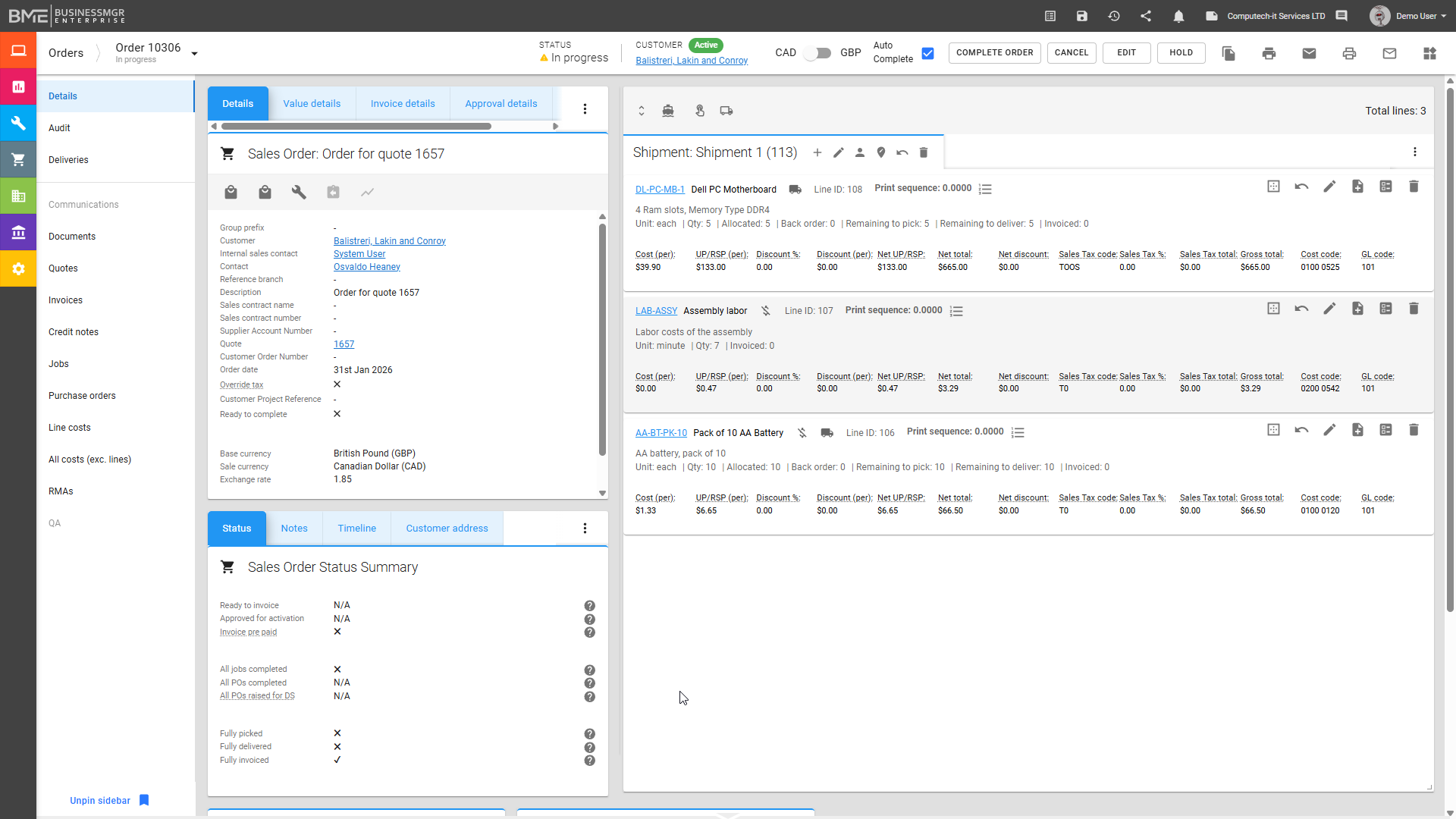
At the heart of BME is the Sales Order module. BME provides a powerful sales order environment designed to turn agreed business into well-managed operational activity, with an interface that can be tailored to suit each user. Sales orders can be created and managed in multiple currencies, with the ability to switch between the base currency and the sales currency.
At the heart of BME is the Sales Order module. BME provides a powerful sales order environment designed to turn agreed business into well-managed operational activity, with an interface that can be tailored to suit each user. Sales orders can be created and managed in multiple currencies, with the ability to switch between the base currency and the sales currency.
They support multiple shipments, link directly to multiple carriers to help identify the best available shipping rates, and allow stock to be allocated or reserved against demand. Partial deliveries and shipment status tracking help users manage fulfilment accurately as orders progress, while critical-path reporting highlights promised and required delivery dates, overdue-day calculations, and other key milestones.
Where available quantity is insufficient to meet demand, back orders can be created automatically, ensuring that shortfalls are tracked and managed without manual intervention. Multiple jobs can be created from a sales order at line level, for the order as a whole, or for Build to Order (BTO) inventory assembly jobs, while multiple invoice types can be generated, including deposit invoices, pro-forma invoices, and consolidated invoicing where required.
Orders may also be duplicated to save time, purchase orders can be created directly from a sales order or linked to existing ones, and sales orders can be associated with projects or created from them. Approval controls can be applied where needed, and costs gathered from jobs and other related areas help ensure that margin and overall profitability can be monitored at both line and order level throughout the process.
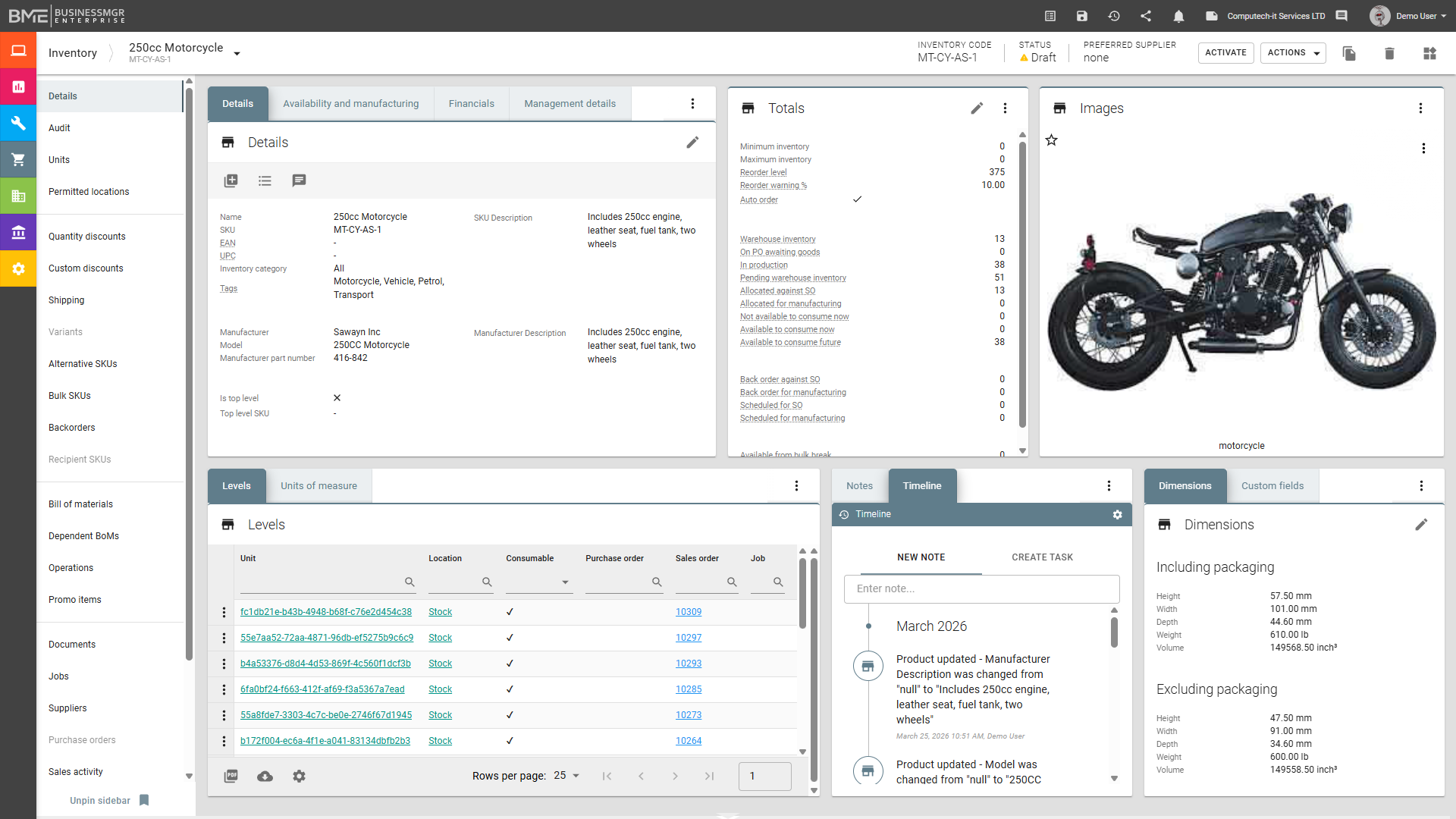
BME provides a powerful inventory environment designed to give businesses clear visibility and control over stock throughout the wider platform. Inventory remains directly connected to sales orders, purchasing, projects, jobs, and fulfilment activity, helping users manage availability, commitments, stock movements, and replenishment from one integrated system.
BME provides a powerful inventory environment designed to give businesses clear visibility and control over stock throughout the wider platform. Inventory remains directly connected to sales orders, purchasing, projects, jobs, and fulfilment activity, helping users manage availability, commitments, stock movements, and replenishment from one integrated system.
Warehouse management supports multiple warehouses, locations, bins, and specialist locations, while storage routing helps support efficient picking paths. Serial and batch tracking, lot traceability, stock valuation methods, stock takes, and stock adjustments all contribute to accurate and fully visible stock control. Kitting and assemblies are also supported, and items can be designated as assemblies, finished goods, drop-shippable products, or Build to Order (BTO) items.
Unit-of-measure controls support products such as liquids, lengths, areas, and volumes by storing stock in the smallest defined unit for accuracy. Different units of measure can also be selected at quotation or sales order level, allowing the commercial process to reflect the most appropriate unit for the customer while maintaining accurate underlying stock control. Products can also be sold by square metre or other volumetric measures where required.
Alternative SKUs can be recommended, bulk SKUs can be broken down, and records can be duplicated to save time during setup. Each product can hold multiple vendors, with one designated as the preferred supplier. Costs for assemblies can be captured at a granular level, including assembly cost, time, and required resources. Documents may be stored against inventory items, items can be quarantined, and QA Non-Conformance Reports (NCRs) can be raised directly against stock where needed.
Customer-owned product can also be stored and tracked within inventory, supporting third-party logistics (3PL) and other customer-specific stockholding requirements. This allows inventory to be managed as a live operational resource rather than a disconnected stock file, improving accuracy, responsiveness, and overall control.
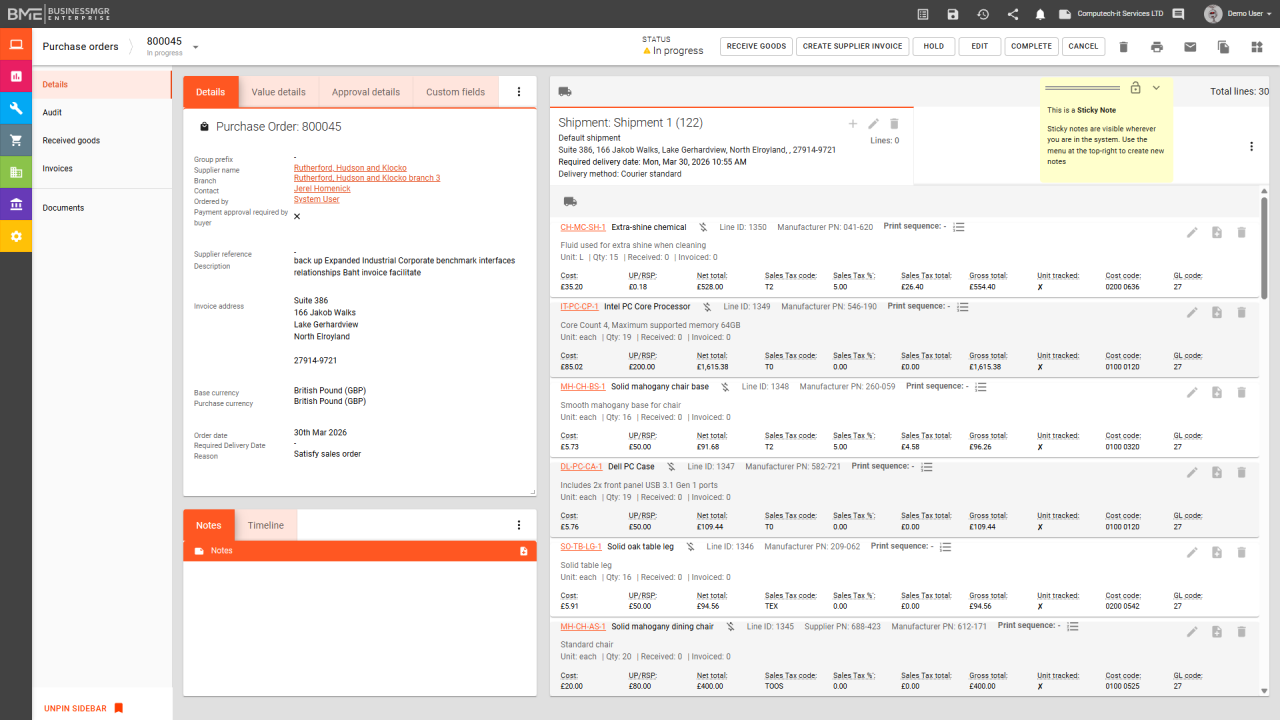
BME provides a powerful purchase order environment designed to give businesses clear control over supplier commitments, incoming stock, and purchasing costs. Purchase orders can be created directly from projects, jobs, sales orders, and inventory, helping procurement respond naturally to operational demand across the wider platform.
BME provides a powerful purchase order environment designed to give businesses clear control over supplier commitments, incoming stock, and purchasing costs. Purchase orders can be created directly from projects, jobs, sales orders, and inventory, helping procurement respond naturally to operational demand across the wider platform.
Multi-currency purchasing supports supplier relationships across different markets, while supplier-specific pricing, preferred vendor logic, and multiple vendors per SKU support better purchasing decisions. Purchase orders can also include extended descriptions and freeform entry of non-stock items, giving users greater flexibility in handling ad hoc purchasing and supplier-specific requirements.
Approval controls can be applied where needed, and purchase orders can support multiple shipments, including drop shipments where supply is delivered directly to the customer. Partial receipts, goods-received handling, receipt of lot or batch numbers, serialised inventory control, expected versus actual delivery tracking, and landed cost management all help maintain accurate visibility of incoming supply and true acquisition cost.
Supplier invoices can also be created directly from the purchase order, helping simplify accounting integration and reduce duplicated data entry. Documents can be stored against purchase orders, keeping supporting information connected to the transaction. Because purchasing sits within the wider platform, users can maintain clear visibility of suppliers, lead times, stock impact, and delivery expectations from one integrated system, helping keep procurement aligned with demand and improving overall supply-chain control.
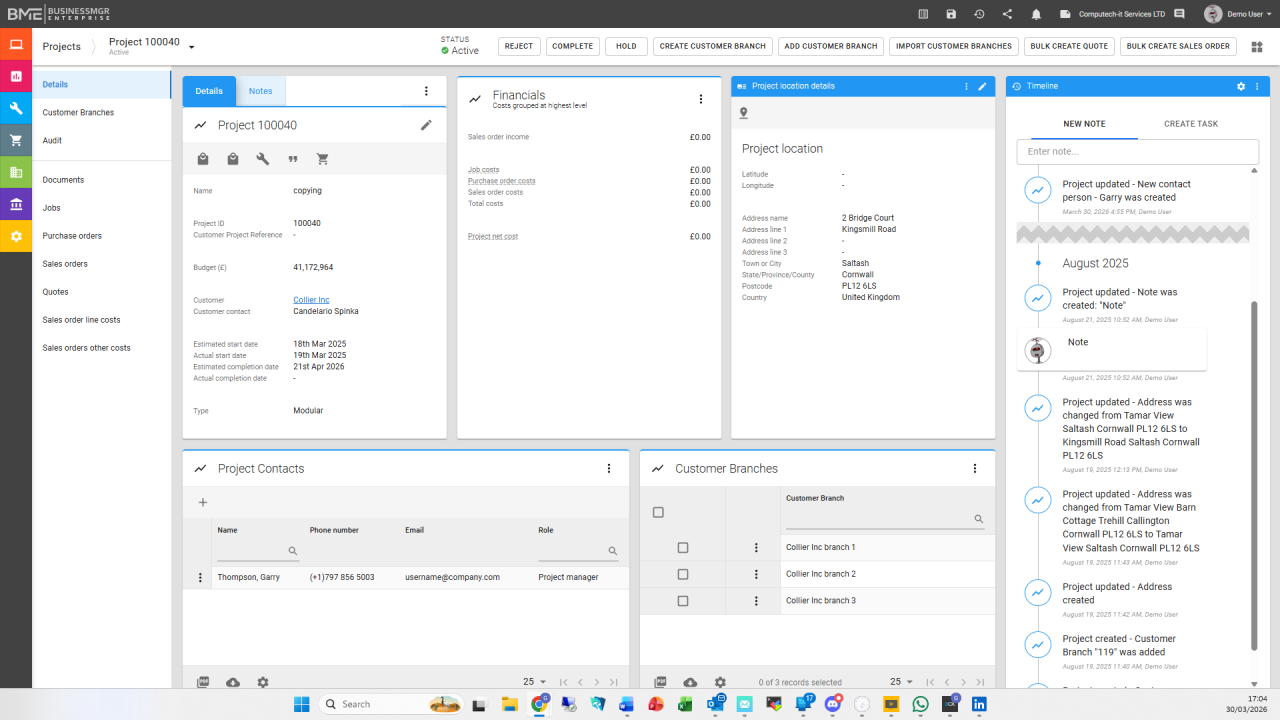
BME provides a powerful project environment designed to connect planning, delivery, commercial activity, and cost control within one integrated platform. Projects can be created for customer-facing work or internal use, with locations selected from existing customer records or imported where required. Project status and stages can be controlled, contacts and resources can be assigned, and timelines or milestones can be tracked to support clearer delivery management.
BME provides a powerful project environment designed to connect planning, delivery, commercial activity, and cost control within one integrated platform. Projects can be created for customer-facing work or internal use, with locations selected from existing customer records or imported where required. Project status and stages can be controlled, contacts and resources can be assigned, and timelines or milestones can be tracked to support clearer delivery management.
Quotes and sales orders can be created individually or generated in bulk from templates, helping manage large-scale rollouts across multiple customer branches or locations. Jobs and purchase orders can also be created directly from the project, while existing purchase orders can be linked back to it so related activity remains connected and visible in one place.
Financial summaries are shown at project level, and costs from related records are brought back into the project for comparison against budget, giving users clearer visibility of performance and control. Project locations can also be linked to Google Maps where required, while audit tracking and document management ensure that changes, supporting records, and key project information remain fully accessible throughout the lifecycle.
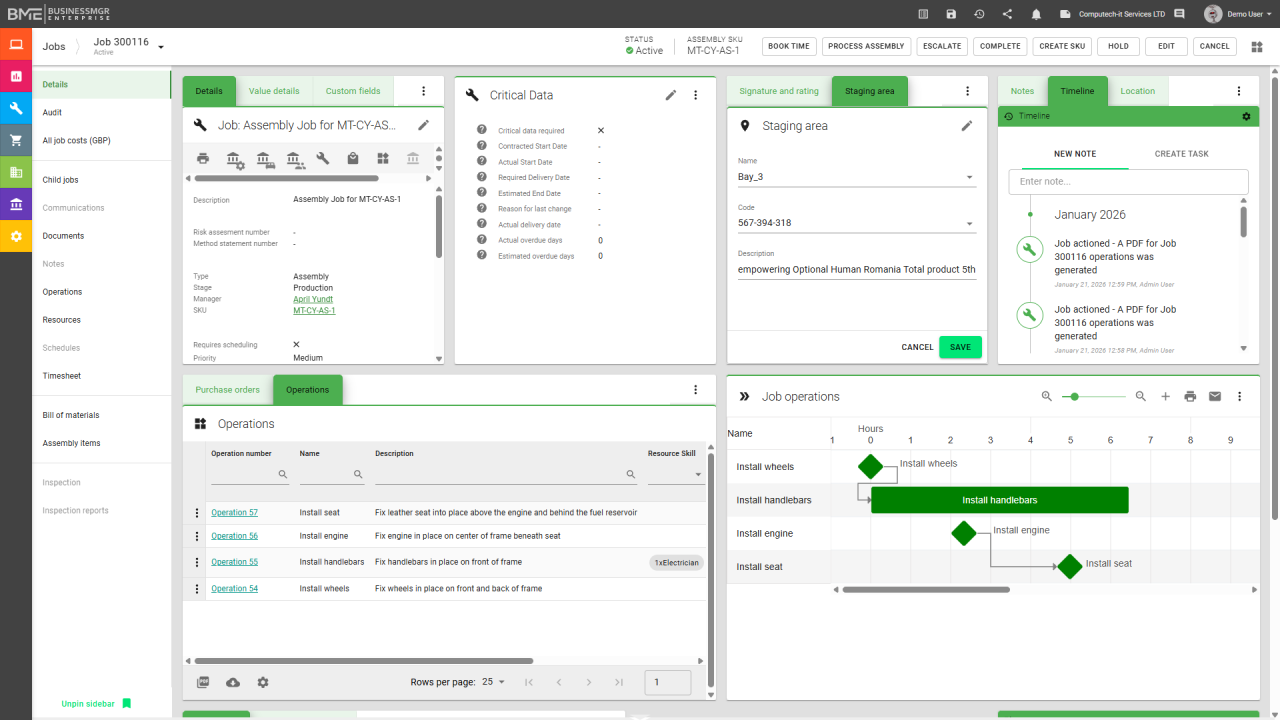
BME provides a powerful job management environment designed to control the work required to deliver products, services, and operational tasks across the wider platform. Jobs can be created directly from sales orders, projects, inventory, and other related activity, with status and stage control, assigned staff, scheduling, dependencies, risk assessment references, and method statements helping users manage work clearly from start to finish.
BME provides a powerful job management environment designed to control the work required to deliver products, services, and operational tasks across the wider platform. Jobs can be created directly from sales orders, projects, inventory, and other related activity, with status and stage control, assigned staff, scheduling, dependencies, risk assessment references, and method statements helping users manage work clearly from start to finish.
Jobs can also be created for the assembly or manufacture of inventory where required. Time capture, materials issued, subcontractor costs, linked documents, completion records, and sign-off all contribute to accurate delivery control and job costing. Because jobs sit within the wider platform, they remain connected to inventory, purchasing, sales, and financial control, giving users clearer visibility of progress, work in progress, and job profitability.
A remote mobile app is also available to support Field Service, allowing time to be recorded, photographs to be uploaded from the field, and customer signatures and satisfaction ratings to be captured while keeping job activity connected to the wider system. These records, including photographs, can also be stored within Document Management as part of the overall job history.
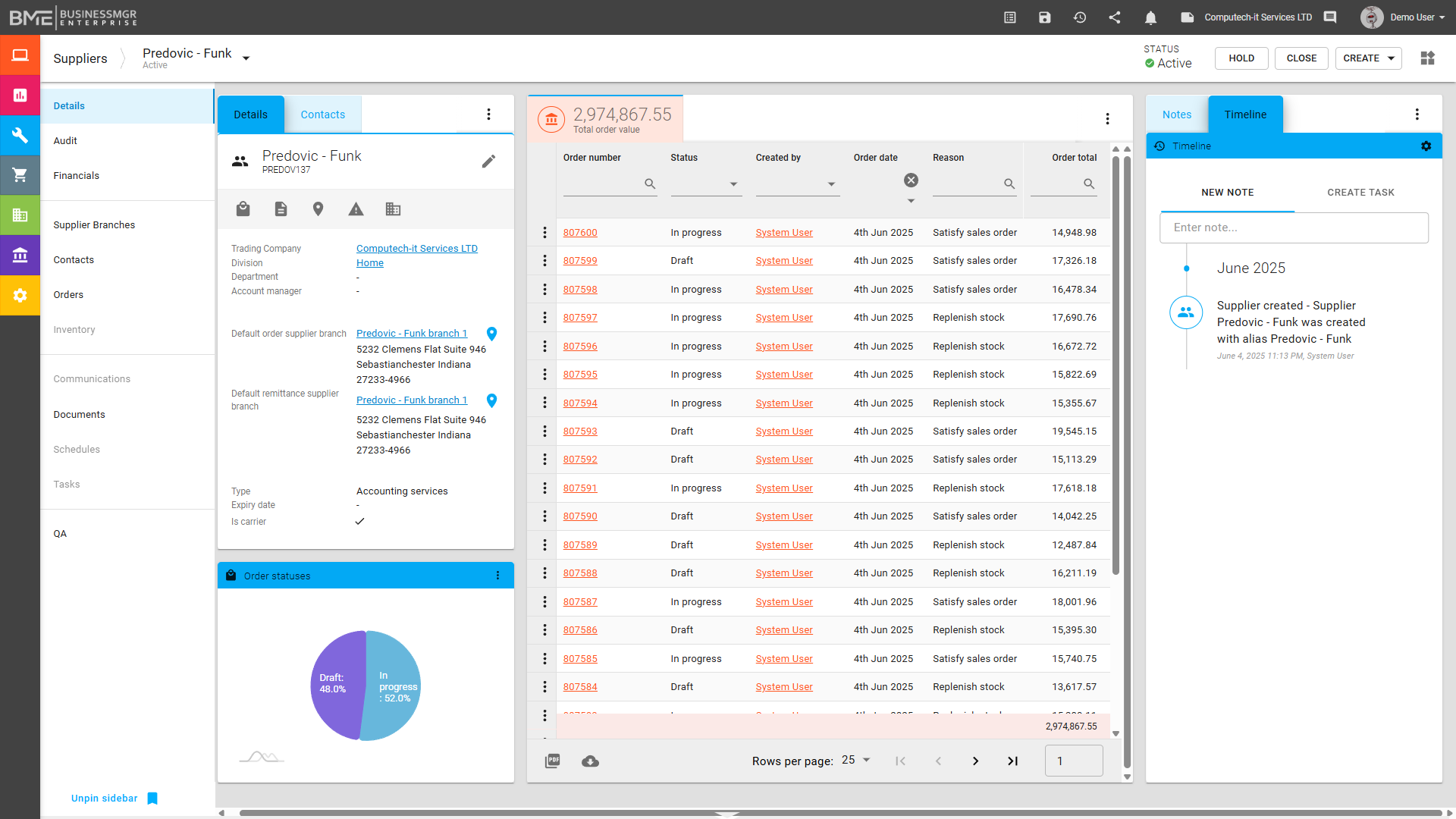
BME provides an integrated Suppliers and Vendor Management environment designed to give businesses clear visibility and control over supplier relationships across the wider platform. Supplier records can hold products or services, supplier-specific pricing, lead times, and preferred vendor settings, helping users make more informed purchasing decisions.
BME provides an integrated Suppliers and Vendor Management environment designed to give businesses clear visibility and control over supplier relationships across the wider platform. Supplier records can hold products or services, supplier-specific pricing, lead times, and preferred vendor settings, helping users make more informed purchasing decisions.
Multiple vendors can be linked to the same SKU, allowing procurement teams to compare supply options and maintain flexibility. Because supplier information remains connected to inventory, purchase orders, accounting, and quality processes, businesses can manage commercial terms, operational performance, and supplier-related issues from one integrated system.
NCRs can also be raised directly against suppliers for either products or services, helping maintain traceability, accountability, and stronger supplier oversight.
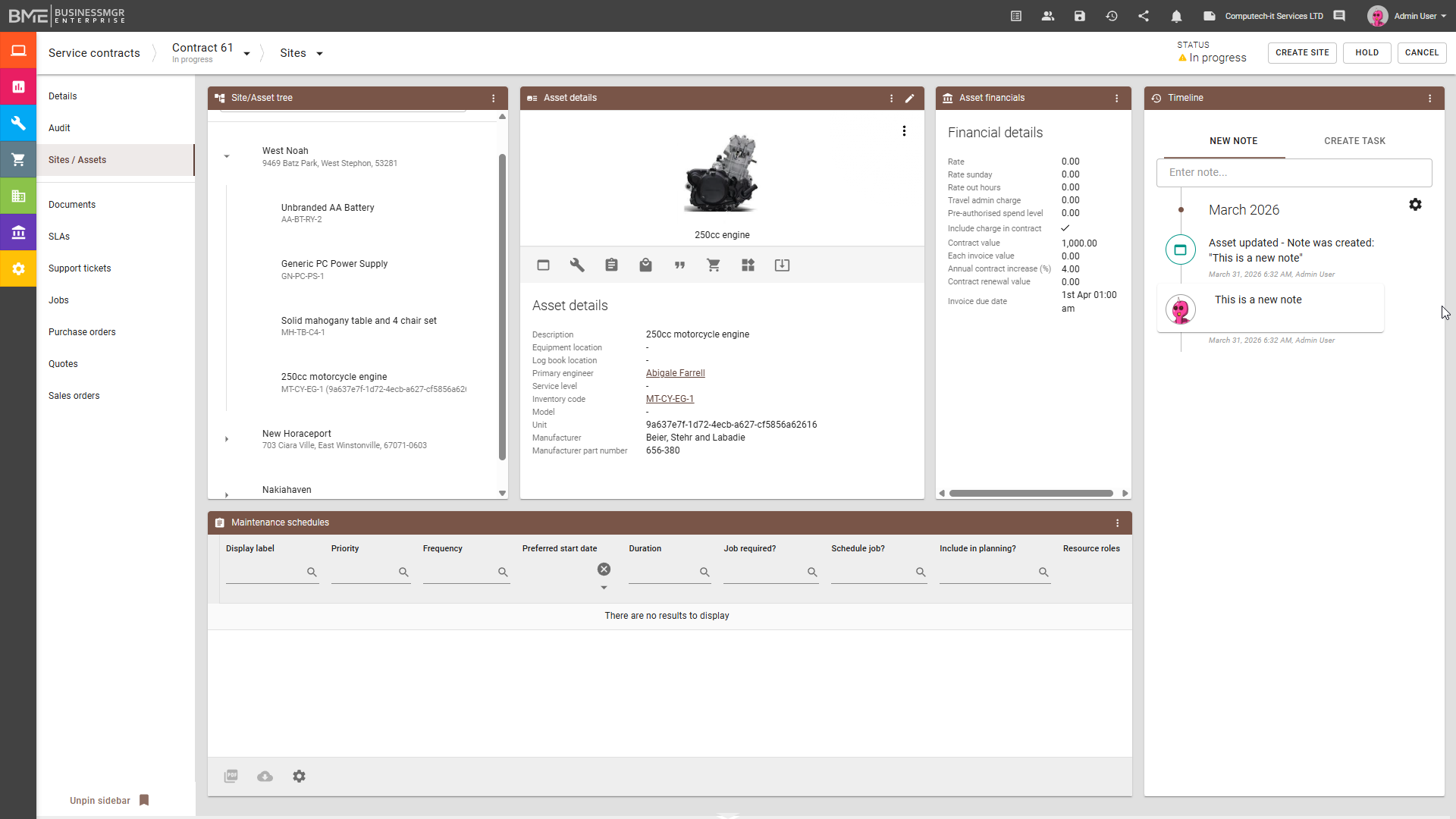
BME provides an integrated Service Contracts and Asset Management environment designed to give businesses clear visibility and control over contracted sites, supported assets, and their ongoing service requirements. As with other BME modules, the interface can be customised to suit the user. A service contract can cover a single site or multiple sites, with each contract providing a structured view of the locations it supports.
BME provides an integrated Service Contracts and Asset Management environment designed to give businesses clear visibility and control over contracted sites, supported assets, and their ongoing service requirements. As with other BME modules, the interface can be customised to suit the user. A service contract can cover a single site or multiple sites, with each contract providing a structured view of the locations it supports.
Within each site, assets can be organised in an asset tree, allowing parent assets and sub-assets to be managed in context and giving users a clearer view of how equipment and components relate to one another. Contract values can be handled either at overall contract level or at individual asset level, with asset values summarised back to the contract where required. Assets can also be assigned their own value without necessarily being included in the contract total, giving greater flexibility in the way commercial, service, and reporting requirements are managed.
Maintenance schedules, asset-level financial details, timeline history, and linked documents can all be managed against the asset record, while SLAs, support tickets, jobs, purchase orders, quotes, and sales orders remain connected within the same contract, site, and asset structure.
The module can be used both to record and manage internal company assets and, in a Field Service environment, to manage and service customer assets. In association with the Jobs module and Remote Jobs App, Field Service teams can also carry out installations, servicing, and repairs in line with the relevant contract, helping ensure that on-site activity remains directly connected to the assets, service obligations, and wider operational record. This makes the module particularly relevant to sectors such as HVAC, Fire and Security, and other service-led operations where asset visibility, maintenance, and contractual control need to work together.
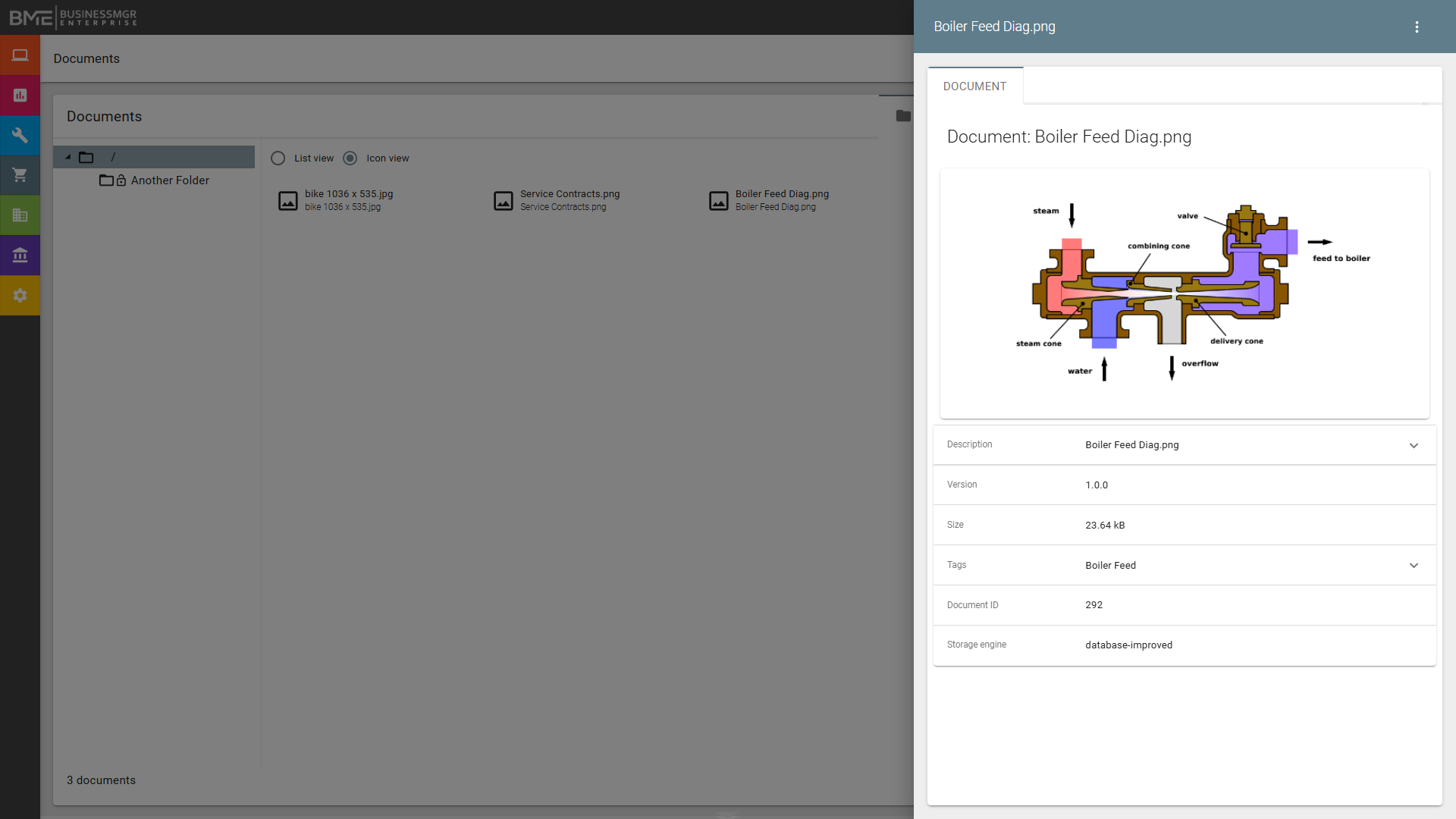
BME provides integrated Document Management across the wider platform, allowing important files and supporting records to be stored directly against the areas they relate to. Documents can be attached to customers, quotes, sales orders, purchase orders, projects, jobs, assets, inventory, and other relevant records, helping ensure that important information remains connected to the transaction, activity, or asset it supports.
BME provides integrated Document Management across the wider platform, allowing important files and supporting records to be stored directly against the areas they relate to. Documents can be attached to customers, quotes, sales orders, purchase orders, projects, jobs, assets, inventory, and other relevant records, helping ensure that important information remains connected to the transaction, activity, or asset it supports.
Document categories and folder structures help keep records organised, while access permissions, document history, and built-in version control provide stronger control over how information is managed and used over time. Image, PDF, and document files are supported, with drag-and-drop upload making it easy to add records quickly, while previews are available for PDF and image files to improve visibility without unnecessary downloading or opening of external applications.
Photographs captured from the Jobs App can also flow into Document Management, helping keep field activity connected to the wider operational record. Attachments can also be included in workflows where required, ensuring that supporting information remains available as processes move through the system. This improves visibility, supports control, and helps ensure that commercial, operational, and service information remains complete, accessible, and available in context.
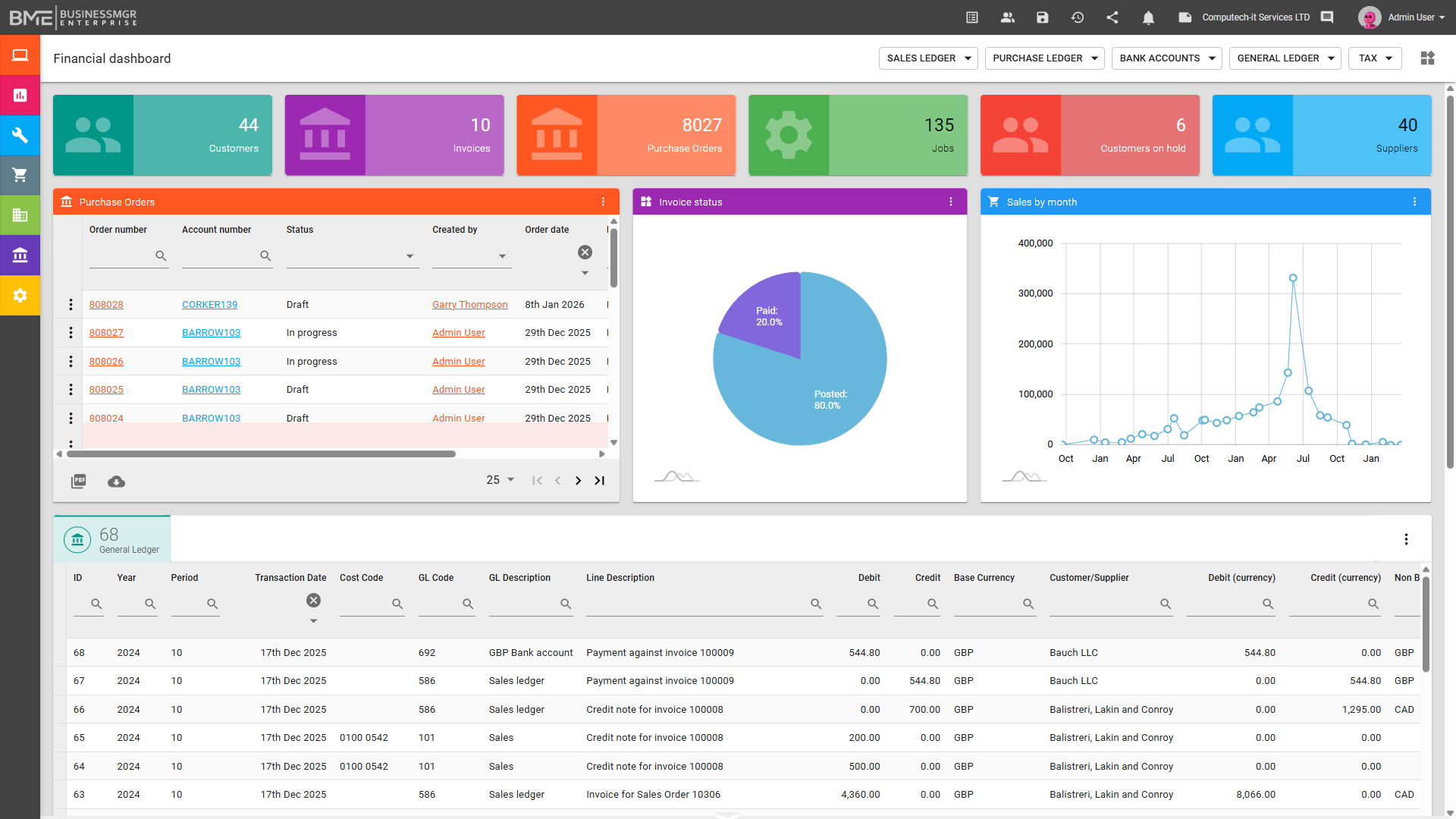
BME provides a fully integrated accounting and financial management environment, allowing finance to operate as part of the same live platform rather than through external synchronisation alone. Sales ledger, purchase ledger, and nominal ledger are all included, with support for multi-company, multi-division, multi-department, and cost centre structures.
BME provides a fully integrated accounting and financial management environment, allowing finance to operate as part of the same live platform rather than through external synchronisation alone. Sales ledger, purchase ledger, and nominal ledger are all included, with support for multi-company, multi-division, multi-department, and cost centre structures.
Multi-currency processing, VAT and tax handling, and US Sales Tax calculation support financial control across different operating models and territories. Bank reconciliation, journals, period controls, consolidation, and financial reporting are all available within the platform, helping users maintain accurate and timely oversight of performance.
Drill-down from financial figures to the underlying source transactions ensures that reporting remains transparent, traceable, and fully connected to the operational records behind it. A customisable financial dashboard also provides KPI tiles, charts, graphs, and lists for fast visibility of key information, while the general ledger can be filtered and exported to support deeper analysis and reporting.
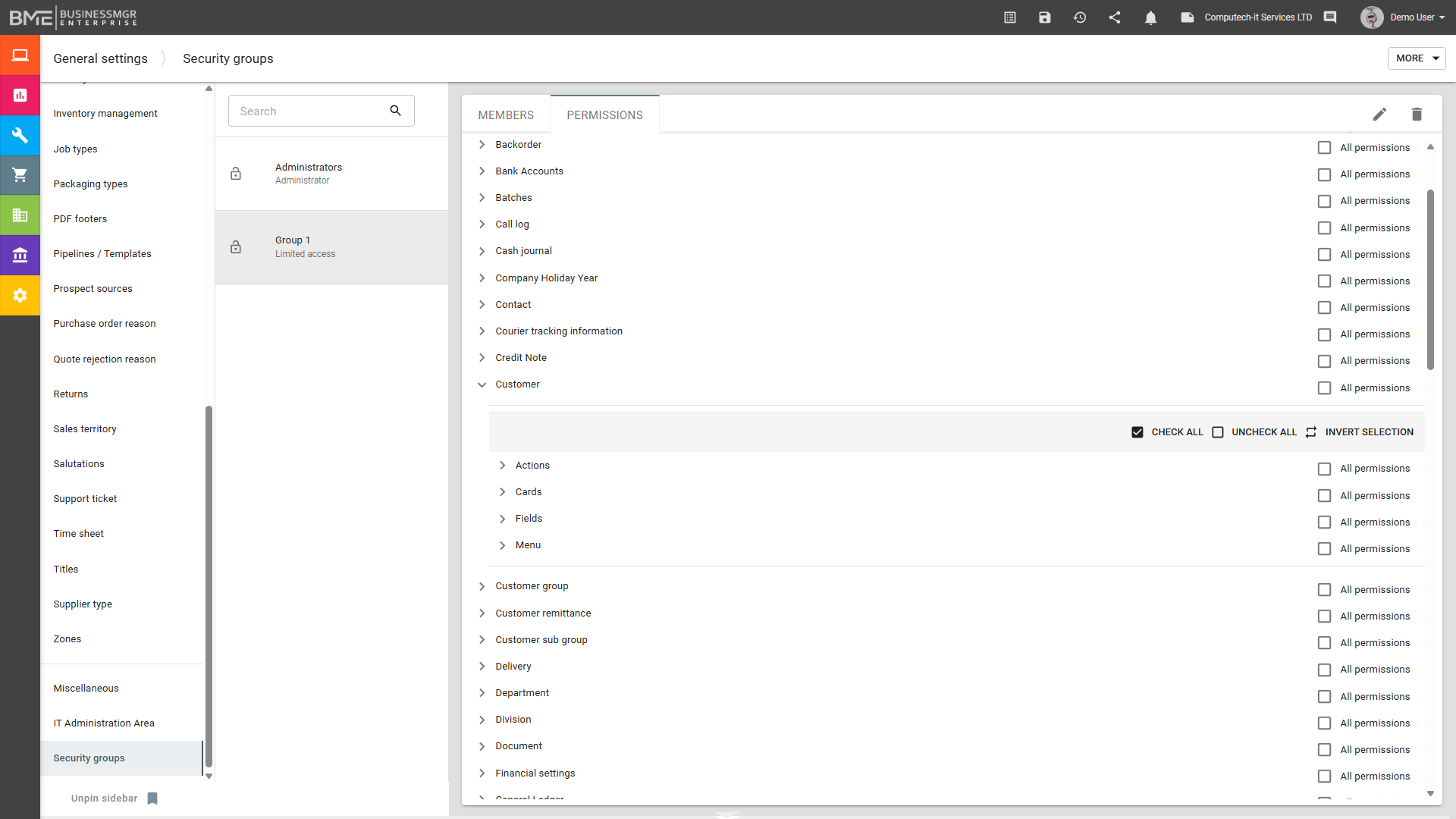
BME provides granular security and user-permission controls across the wider platform, helping businesses align access to information and functionality with each user's role and responsibilities. Users can be assigned to security groups, with permissions managed at a detailed level across modules, menus, data cards, fields, and individual actions.
BME provides granular security and user-permission controls across the wider platform, helping businesses align access to information and functionality with each user's role and responsibilities. Users can be assigned to security groups, with permissions managed at a detailed level across modules, menus, data cards, fields, and individual actions.
Create, edit, and delete rights can be controlled where needed, while menu visibility, field-level permissions, and data card visibility help ensure that users see only the functions and information relevant to them. Role-based dashboards and views are also tied to permissions, helping present the right information in the right context for each user.
Because these controls apply across the same integrated platform, businesses can combine user flexibility with stronger governance, accountability, and operational control.
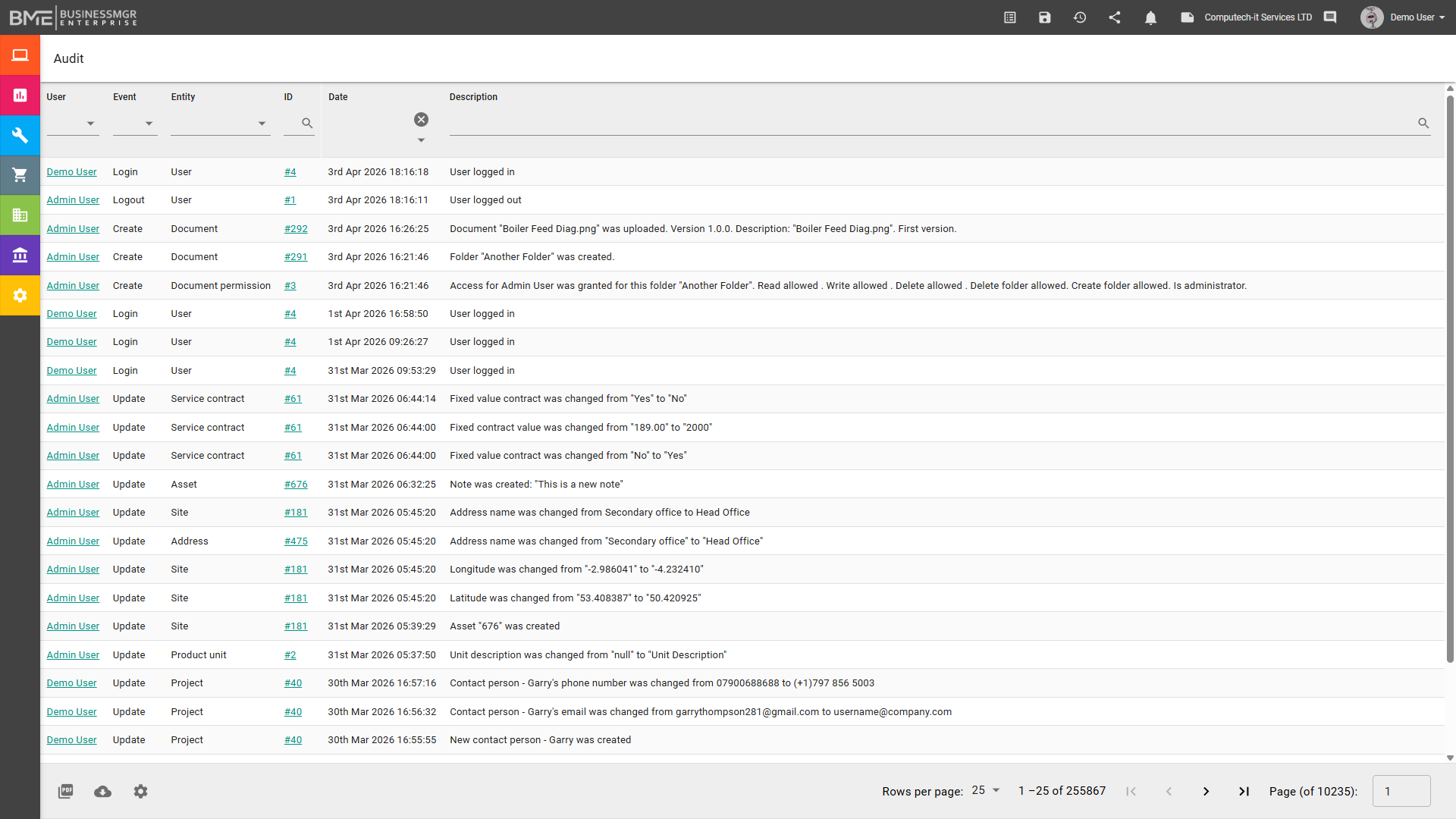
BME provides a comprehensive audit trail across the wider platform, helping businesses maintain clear visibility of what has happened, when it happened, and who carried it out. Changes, updates, and activity can be tracked against relevant records, giving users stronger accountability and traceability across day-to-day operations.
BME provides a comprehensive audit trail across the wider platform, helping businesses maintain clear visibility of what has happened, when it happened, and who carried it out. Changes, updates, and activity can be tracked against relevant records, giving users stronger accountability and traceability across day-to-day operations.
This supports internal control, helps resolve queries more easily, and provides a reliable history of actions across commercial, operational, and service processes. Because the audit trail remains connected to the live records behind each transaction and update, businesses gain stronger governance, clearer oversight, and greater confidence in the integrity of their operational data.
This is particularly valuable in sectors such as engineering, manufacturing, field service, healthcare-related operations, and other environments where accountability, traceability, and process control are essential.
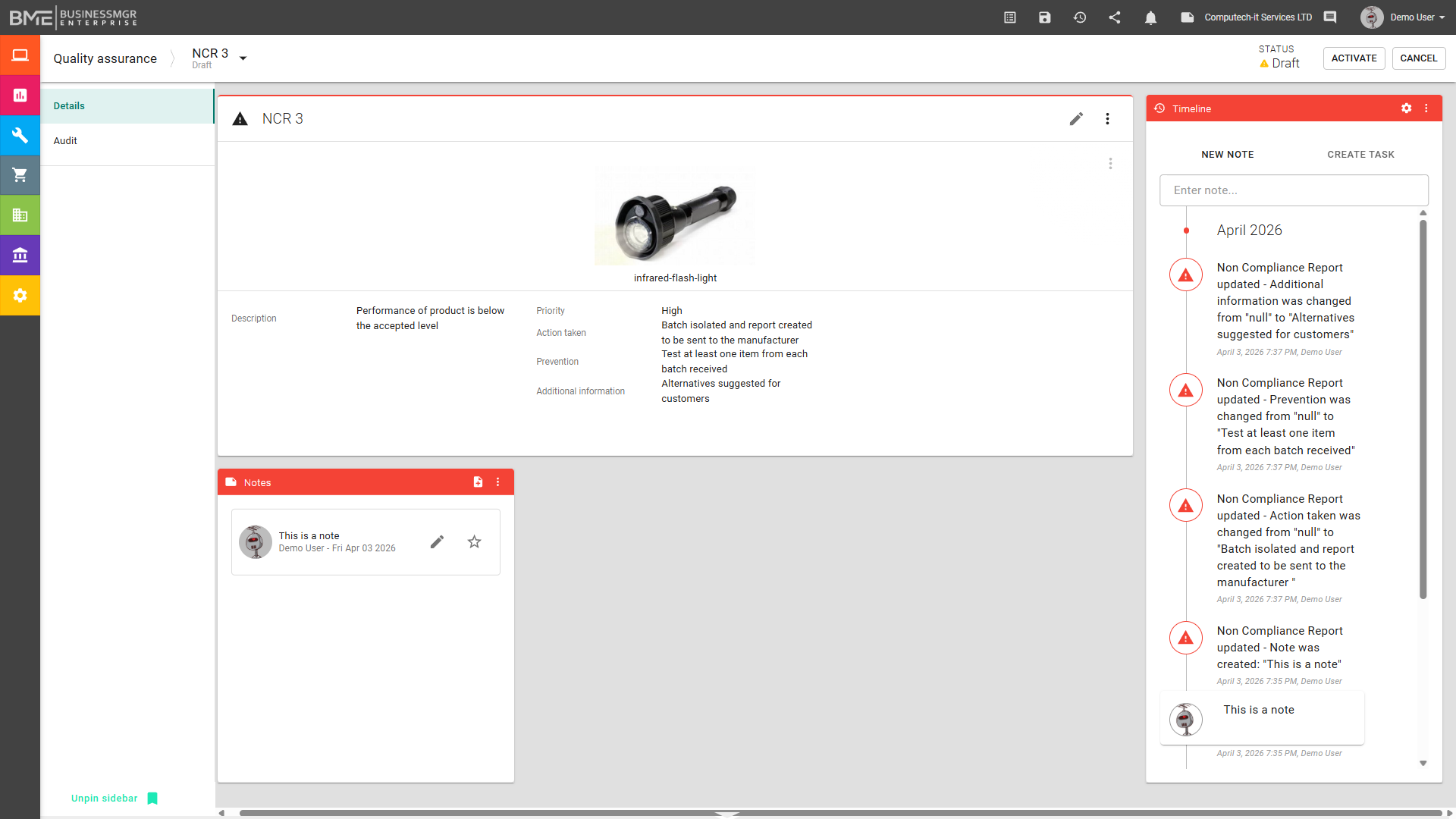
BME provides integrated Quality Assurance controls to help businesses maintain standards and manage quality-related activity within the wider platform. Stock can be quarantined where required, and Non-Conformance Reports (NCRs) can be raised directly against items so that issues are identified, recorded, and managed in context.
BME provides integrated Quality Assurance controls to help businesses maintain standards and manage quality-related activity within the wider platform. Stock can be quarantined where required, and Non-Conformance Reports (NCRs) can be raised directly against items so that issues are identified, recorded, and managed in context.
NCRs can also be used to record customer complaints, helping ensure that these are captured, tracked, and fully traceable through to review and resolution. They are also available within vendor and supplier records, allowing an NCR to be raised against either a supplied product or a service provided by the supplier.
Because QA activity remains connected to inventory, jobs, documents, and the wider operational record, businesses gain clearer visibility of quality issues and stronger control over how they are investigated, tracked, and resolved. Together with the audit function, this supports the traceability, accountability, and process discipline that are essential elements of ISO 9001-style quality management. This is particularly valuable in sectors such as manufacturing, engineering, field service, healthcare-related operations, and other environments where quality control and traceability are essential.
Who develops BME and why does it matter?
BME is developed by a team with more than 30 years of award-winning business software experience, including past recognition through the Queen's Award for Export and ISO 9001:2015 accreditation for quality management.
AWARD WINNING
The developers of BME are past recipients of the Queens Award for Export
One of the most prestigious awards for a UK Company.
PROVEN EXPERTISE
We have been providing businesses with custom solutions for more than 30 years.
QUALITY ASSURED
We have been accredited for ISO 9001, which means our quality controls meet the most stringent international standards.
Contact Us
Contact the BME team today to discuss how we can partner with you to achieve your business goals. We're here to ensure that your business operates at its best, every step of the way.