Supply chain management software for small business tracks goods from the moment you order them from a supplier to the moment they reach your customer. Along the way it should be able to tell you what’s on the shelf and what each order really cost. That’s the whole job. Forecasting models and planning teams belong to the enterprise version, and most small businesses aren’t there yet.
What most small businesses have instead is a reconciliation problem. The purchase order sits in one system and the stock level in another, while the supplier invoice lives in the accounts. The real count is in somebody’s head. Ask what’s available to sell this afternoon and you’ll get a pause before the answer.
We build Business Manager Enterprise (BME), so we have an interest in how you solve that. We’ve tried to make this guide useful whichever way you go, and we’re clear about the parts of the supply chain we don’t cover.
What is supply chain management software?
Supply chain management (SCM) software coordinates the movement of goods from supplier to customer, along with the money and paperwork that follow them. In a large business it stretches from demand planning to transport, usually across several specialist systems.
In a small business the chain is shorter. You need to know when to reorder and from whom. You need to see which customer orders are waiting on which deliveries, and what a delivered order cost once everything landed. Panorama Consulting, an independent ERP consultancy, makes a useful point in its 2026 SCM review: dedicated SCM platforms tend to extend an ERP system rather than replace it. For a small business, the foundation comes first.
Which part of the supply chain do you need software for?
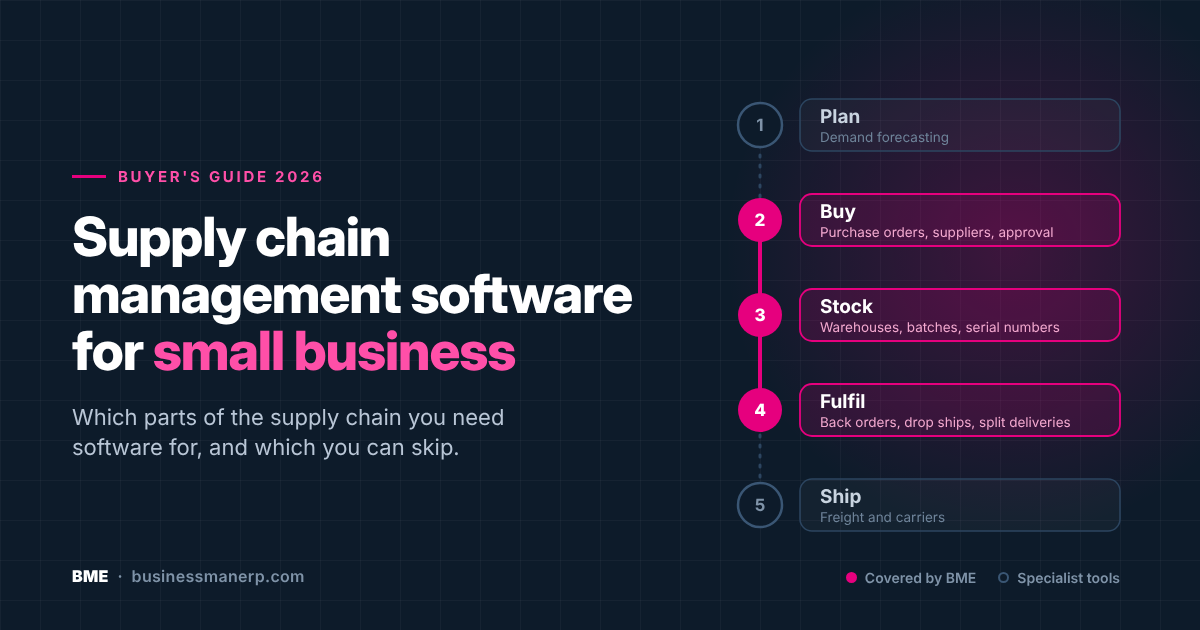
“Supply chain” covers five quite different jobs, and each needs different software. That’s why search results for this topic look so confusing. When we checked Capterra’s list of supply chain software for small businesses in October 2026, three of the top ten products were freight and transport tools (FreightPOP, Freightview and MyCarrierTMS), sitting alongside forecasting tools, inventory tools and NetSuite, the only full ERP. They all belong somewhere in the chain, but they solve different problems. Work out which job is hurting before you compare anything.
Planning and demand forecasting
Forecasting software predicts what you’ll sell and recommends what to buy, often using statistical or AI models. It earns its keep once you hold hundreds of product lines with seasonal or erratic demand. Netstock, which Panorama describes as built for small to mid-market companies, is one example. Flowlity is another.
BME doesn’t include demand forecasting. It replenishes on minimum stock levels and supplier lead times, which suits steady demand but won’t model seasonality for you. If forecasting is your main problem, you need a planning tool, and that tool will need clean stock and purchasing data underneath it.
Purchasing and supplier management
Purchasing starts with knowing when to reorder and ends with checking the supplier’s invoice against what you agreed. For most small businesses it’s where errors start. The PO goes to the wrong supplier, or at last year’s price, or nobody approved it. Reordering from memory works until the person with the memory goes on holiday.
In BME, each stock item can carry a minimum level that flags replenishment, either by purchase or by manufacture if you assemble it yourself. Per item, you can also set a minimum purchase quantity, preferred suppliers and lead times. If preferred or alternative suppliers are set, the PO must go to one of them, and the system enforces that rather than leaving it to memory. Purchase orders can also carry free-text lines for one-off buys, and they go through a buyer approval step before payment is approved. The comprehensive ERP feature page lists the detail.
Portalis, a control-room technology start-up in Salt Lake City, chose BME over separate CRM and inventory tools for this reason. Its team wanted purchase order tracking, inventory and supplier management in one place alongside customer records, so the same data wasn’t entered into several applications and kept in separate databases. The Portalis case study tells the story.
Stock and warehousing
Stock software tells you what you hold and where it is. For a small business, the jump from one stockroom to two sites, or to a stockroom plus vans, is when spreadsheets tend to give up.
BME supports as many warehouses, aisles and bays as you need, across multiple sites. A bay can carry weight and size limits, be marked as temperature controlled or restricted, and take on a role. A quarantine bay for goods awaiting inspection is a common one. You can restrict an item to permitted locations and make orders draw only from stock at their own site. Our guide to warehouse management software for small business covers this side in depth.
Traceability belongs here too. A supplier recalls a batch. Can you say which customers received it? For food, electronics or anything sold with a warranty, that question decides whether a recall costs an afternoon or a week. BME records serial numbers and lot or batch numbers, allocates them by company policy, and lets items carry use-by and use-after dates. Stock can be issued FIFO, LIFO or lowest cost first, or picked manually, and grey-listed or black-listed to stop it being sold. In any demo, ask to run a recall from a batch number to the customer list. It’s the quickest real test of a stock system.
Order fulfilment
Fulfilment gets the right goods to the right customer. The awkward cases decide whether it works. Think of items you don’t have yet, goods shipped straight from the supplier, or one order split across several deliveries.
BME handles back orders and drop shipments direct from supplier to customer. A single sales order can carry multiple shipments, including scheduled future deliveries to different addresses. Purchase orders split into shipments the same way, each with its own delivery address and drop ship details.
Freight and logistics
Freight software books carriers and tracks shipments in transit. It’s a specialist category known as transport management software (TMS), and it’s what most of the freight tools on those directory lists do.
BME isn’t a TMS. If you ship pallets daily across several carriers, you’ll want a dedicated freight tool alongside whatever runs your stock and purchasing. The same goes for EDI with large retailers, where a specialist such as TrueCommerce handles the connection. EDI isn’t part of BME’s published feature set.
Following one purchase order through BME
Feature lists all look alike. Following a single purchase from start to finish shows what’s connected and what isn’t. Here’s the path one order takes through BME, using only what the system does as standard.
- Stock of an item drops below its minimum level, and BME flags it for replenishment.
- A buyer raises the purchase order. Because the item has preferred suppliers set, the PO has to go to one of them.
- The PO goes through the buyer approval step before payment is approved.
- The PO is placed in the supplier’s own currency (Premium or perpetual), converted to your base currency for the accounts.
- The order is split into shipments. One goes to your warehouse, one is drop shipped straight to a waiting customer.
- When the PO is executed, it creates the matching entry for the supplier’s invoice, so the invoice can be checked against what you agreed to pay.
- If the goods were bought for a job, the purchase order cost lands on that job. From there it rolls up to whatever created the work, whether that’s a sales order, a contract or a project.
Two steps that matter in every system aren’t covered in our published documentation: booking in a delivery against the PO, including part-deliveries, and barcode scanning at goods in. Ask us to show both in a demo, and ask every other vendor too.
Buying from overseas: what UK importers should check
If you import, the price on the supplier’s invoice isn’t what the goods cost you. None of the guides ranking for this topic deal with that, and it’s where small importers most often lose track of their margins.
Those extra costs are moving in the wrong direction. In August 2026, the Office for National Statistics found that 28% of UK businesses with ten or more employees were concerned that international conflict would hit their supply chains over the next year, up 17 percentage points since September 2025. Among the businesses with those concerns, 53% expected the cost of sourcing materials to rise and 46% expected transport costs to rise (ONS Business Insights and Conditions Survey).
The landed cost is more than the invoice
Landed cost is the full cost of getting goods onto your shelf: the supplier price plus freight, insurance, customs duty and handling. HMRC’s guidance on delivery costs in the customs value is clear that transport, insurance and loading charges up to the point the goods enter the UK form part of the customs value. Duty is then worked out on that higher figure, not on the invoice price alone. Surcharges such as peak season and port congestion charges count too.
If your system only records the supplier price, every imported item looks more profitable than it is. That gap matters most when prices are changing. In the British Chambers of Commerce’s Q2 2026 survey of 4,744 UK firms, 92% of them small and medium-sized, 48% expected to raise their own prices within three months (BCC Quarterly Economic Survey). Reprice from the invoice alone and the new price can still undercut your real cost. Ask any vendor whether freight and duty can be added to the item’s stock cost, and how. Landed cost isn’t described in BME’s published feature set, so ask us to show you how we’d handle it.
| Cost | Amount |
|---|---|
| Supplier invoice, 1,000 units (converted to sterling) | £10,000 |
| Freight and insurance to the UK border | £1,200 |
| Customs value (invoice plus delivery costs to the border) | £11,200 |
| Customs duty at an illustrative 4% of customs value | £448 |
| Haulage from the port to your warehouse, charged separately | £300 |
| Customs clearance fee | £150 |
| Landed cost | £12,098 |
Each unit cost £12.10 to get onto the shelf, not the £10.00 on the invoice, a difference of about 21%. Sell at £15 and the margin you think you’re making is 33%. The margin you’re actually making is about 19%. Import VAT is left out because a VAT-registered business using postponed VAT accounting recovers it, but the cash timing still matters if you pay it at the border instead.
Import VAT doesn’t have to cost you cash
VAT-registered businesses can use postponed VAT accounting. According to HMRC’s guidance, you declare and recover import VAT on the same VAT Return rather than paying it at the border and reclaiming it later. No approval is needed, but you choose it on the import declaration and can’t change it afterwards. Since June 2025 it has been optional rather than mandatory. You’ll download a monthly postponed import VAT statement to support your return, so your accounts need to match it.
Buy in the supplier’s currency
Euro and dollar purchase orders converted by hand in a spreadsheet are where costs drift, because the rate used depends on who typed it. BME purchase orders can be raised in any currency and converted to your base currency for the accounts at the exchange rate you choose. One plain caveat applies. Multi-currency is included in our Premium subscription and in perpetual licences, not in Standard. If you buy from overseas suppliers, price on Premium from the start.
| Inventory add-on | Integrated business management system (BME) | AI planning platform | Enterprise suite | |
|---|---|---|---|---|
| Examples | Acctivate, Cin7, Zoho Inventory | BME | Flowlity, Netstock | SAP IBP, Kinaxis |
| Data model | Synced to QuickBooks or Xero by connector | One database for purchasing, stock, sales and accounts | Sits on top of your ERP and reads its data | Several modules, often across systems |
| Demand forecasting | Basic or none | None as standard | Core strength | Core strength |
| Purchasing and stock depth | Good for single-site stock | Full purchasing, multi-site warehousing and BOM | Recommends orders, doesn’t run them | Full |
| Setup time | Days to weeks | Weeks to months, tested before go-live | Weeks | Months to years |
| Best fit | Small product range, one site | Growing firms needing one record of stock and cost | Large ranges with variable demand | Large organisations with planning teams |
Flowlity, a planning vendor, argues in its own small-business guide that ERP systems with a supply chain module keep their planning logic basic. For forecasting, that’s fair, and it describes BME accurately. The same guide also says spreadsheets are fine below roughly 100 stock items on a single site, and that planning platforms sit above the ERP and use its data. Taken together, that suggests an order of work. Get purchasing and stock into one accurate record first, connected to the accounts. Add forecasting when your range and demand patterns justify it.
The connector question matters with add-ons too. An inventory tool synced to QuickBooks can match invoice totals perfectly while purchase costs never reach individual orders or jobs. Our guide to integrated business management software covers that difference in detail.
Which one fits where you are now?
Spreadsheets are more common than most software vendors admit. In a March 2026 survey of 400 US warehouse and operations staff by inventory software maker inFlow, 84.8% said they track stock in spreadsheets, and 44.8% named inaccurate inventory data as a top challenge (inFlow State of Inventory Management 2026). It’s a vendor survey and a third of respondents work at firms with 500 or more staff, so treat it as a pointer rather than a benchmark. Still, a spreadsheet isn’t a failure in itself. The question is whether yours still gives you numbers you can trust.
- Stay on a spreadsheet if you sell one product line from one supplier, on one site. Even Flowlity, which sells planning software, says so.
- Add an inventory add-on if your stock sits on one site and you’re happy keeping QuickBooks or Xero at the centre of the business.
- Move to an integrated system once stock figures start disagreeing between tools, you add a second site, or you can’t say what a delivered order cost until month-end. Our guide to small business management software covers that decision.
- Add a planning tool on top when your range is large and demand swings enough that minimum stock levels keep getting it wrong.
What does supply chain management software cost for a small business?
Pricing in this category spans three orders of magnitude, which is part of why it’s hard to compare. Flowlity’s guide gives a reasonable map of the market:
- Inventory and order management tools: free tiers up to a few hundred dollars a month
- Small and mid-market supply chain solutions: a few hundred to a few thousand dollars a month
- Enterprise suites such as SAP or Oracle: six figures a year, plus implementation
Most vendors in the middle band won’t publish exact figures. We do, on our pricing page.
Everything in this guide is included in our Standard subscription at £44 per concurrent user per month, with one exception. Purchasing, stock control, multi-site warehousing, bills of materials and every fulfilment option described above are all on Standard. Multi-currency purchasing needs Premium at £66 per concurrent user per month, or a perpetual licence.
For an importer, that choice is worth working out properly. With five concurrent users, Standard costs £13,200 over five years and Premium costs £19,800, so multi-currency effectively costs £6,600 over that period. Add integrated accounting and the totals become £17,100 and £22,800. A perpetual licence for five concurrent users costs £16,035 over five years including support, with every module included, though you provide the hosting. If you buy from overseas regularly, compare all three before deciding.
We license by concurrent connection, not named user. A buyer and a part-time bookkeeper who are rarely logged in at the same moment can share one connection. We also sell perpetual licences, a one-off purchase with every module included, which you can run on your own servers. Integrated accounting is an optional module at £65 a month on Standard or £50 on Premium. All prices exclude VAT.
Two costs sit outside the subscription. An integrated system takes longer to set up than an inventory app, which is why every purchase includes a free test system for as long as you need it. And customisation to fit your particular processes is quoted separately as development time.
How to choose supply chain management software for a small business
The most reliable way to choose supply chain management software for a small business is to trace one real purchase through every system on your shortlist, from reorder to paid supplier invoice. Work through these steps with each vendor, including us.
- Decide which of the five jobs is causing the pain, and shortlist software built for that job.
- Take one recent purchase and write down every system and spreadsheet it touched.
- Ask the vendor to show the reorder flag and the approval step on that purchase.
- Ask to see a delivery booked in against the PO, including a part-delivery, and how stock updates.
- Ask whether barcode scanning is supported at goods in and picking, and on what hardware.
- If you import, ask how freight and duty get into the item’s cost, and whether the accounts can be reconciled to your postponed import VAT statement.
- Run a batch recall from lot number to customer list.
- Get a five-year cost in writing that includes support and any modules you’ll need, such as multi-currency.
When you’re ready to try that with BME, book a demonstration and bring a recent purchase order with you.
Frequently asked questions
What is supply chain management software?
Supply chain management software tracks and coordinates the flow of goods from suppliers, through your stock, to your customers. For a small business, that means purchasing, stock control and order fulfilment. Larger organisations add demand planning and transport management tools on top.
How much does supply chain management software cost for a small business?
Inventory tools start free, mid-market supply chain solutions run to a few thousand dollars a month, and enterprise suites cost six figures a year. BME’s Standard subscription, which covers purchasing, stock and fulfilment, is £44 per concurrent user per month. Multi-currency purchasing needs the £66 Premium plan or a perpetual licence.
When does a small business need supply chain software?
Usually when stock figures start disagreeing between systems, or when you add a second site and can no longer say what a delivered order really cost. A single product line from a single supplier rarely needs more than a spreadsheet.
Is ERP the same as supply chain management software?
Not quite. ERP covers the whole business in one system, from purchasing to the accounts. Supply chain management software focuses on the flow of goods, and dedicated SCM platforms usually sit on top of an ERP and use its data. Our guide to what ERP is explains the wider picture.
Do small businesses need demand forecasting software?
Most don’t at first. Forecasting pays off with large product ranges where demand swings by season. With steady demand, minimum stock levels and supplier lead times do the job, and forecasting tools need accurate stock and purchasing data before they’re useful anyway.
What is landed cost?
Landed cost is the total cost of getting imported goods into your stock, which means the supplier price plus everything spent bringing them in. Under HMRC rules, transport and insurance up to the UK border are part of the customs value that duty is calculated on, so the invoice price alone understates what imported stock costs you.
Is there supply chain management software for small businesses in the UK?
Yes. BME Software Ltd is based in Saltash, Cornwall, with a US presence in Orlando, Florida, and has built business management software since 1990. Our prices are published in pounds, euros and dollars, and support is available from the UK.
If you hold parts on vans or for engineers, our guide to field service management software for small business covers stock tied to jobs. For the bigger picture of how purchasing and stock connect to the rest of the business, start with what business management software is.