ERP (Enterprise Resource Planning) is business management software that runs a company’s core operations — finance, inventory, manufacturing, sales, purchasing, and HR — from a single shared database, so a transaction entered once is visible everywhere it matters. That last clause is the whole point of ERP, and it is what separates a true ERP system from a collection of apps that happen to sit on the same network.
ERP stands for Enterprise Resource Planning — that is its full form. The three words are literal: it helps an enterprise plan and allocate its resources (money, materials, people, equipment) across the entire organisation rather than one department at a time.
It is not a niche tool. The global ERP software market was worth somewhere between roughly $77 billion and $93 billion in 2025, depending on which analyst firm you ask (Gartner, IDC, and Fortune Business Insights all measure it differently), and Gartner projects around $78.4 billion for 2026. Among companies above $1 billion in revenue, an estimated 95% run an ERP system. ERP is, in other words, the default operating layer of serious businesses — yet most explanations of it stop at the dictionary definition. This guide goes further: what ERP means, what it actually does, the modules and architecture behind it, the one signal that tells you your business needs it, how it differs from CRM and MRP, and the real-world cost, ROI, and failure data you should know before you buy.
ERP is a specific class within the broader category of business management software — and knowing exactly where it sits is the fastest way to decide whether you need it.
What Does ERP Mean? The Term and Its Lineage
ERP is an acronym worth taking apart, because each word constrains what does and doesn’t qualify as ERP.
Enterprise means the whole organisation, not one team — a tool that only does accounting is a point solution, not an ERP. Resource covers everything a business deploys to operate: cash, stock, raw materials, machinery, labour, and time. Planning is the coordination layer that lets a business forecast demand and allocate those resources before bottlenecks form.
The term has a precise origin. The analyst firm Gartner coined “ERP” in 1990 to name the software category that had outgrown its manufacturing roots. That lineage is worth knowing because it explains the shape of ERP today:
- MRP (Material Requirements Planning) appeared in the 1960s–70s to calculate the materials a factory needed for production.
- MRP II (Manufacturing Resource Planning) extended that in the 1980s to cover scheduling, capacity, and shop-floor control.
- ERP (1990) absorbed MRP II and added finance, HR, sales, and procurement — turning a manufacturing planning tool into a whole-business system.
- ERP II (a term Gartner introduced in 2000) opened the system outward to customers, suppliers, and the web.
So when people use ERP, ERP system, enterprise resource planning software, and enterprise resource planning system interchangeably, they are all pointing at the same thing: integrated, database-driven software that runs core business operations as one connected whole.
What Does an ERP System Actually Do?
An ERP system’s core job is to remove the seams between departments. In a business without one, sales lives in one app, finance in another, and the warehouse in a third — and data is re-keyed, exported, and reconciled by hand between systems that don’t talk. That manual reconciliation is slow, error-prone, and quietly expensive.
An ERP system replaces it with a single connected flow. In practice:
- A salesperson raises a quotation; when the customer accepts, it becomes a sales order with no re-typing.
- The order checks live stock. If items aren’t available, it raises a purchase requirement or triggers a manufacturing job automatically.
- On dispatch, the warehouse module updates inventory and the accounting module raises the invoice — from the same record.
- Finance sees the revenue, management sees the margin, and the customer history updates, all from that one original transaction.
That is the defining promise of ERP: enter data once, and every relevant function sees it the moment it changes. Reporting, automation, and forecasting are all built on top of that single-source-of-truth foundation.
The Integration Tipping Point: When a Business Actually Needs ERP
Most articles tell you ERP is “for growing businesses,” which is useless advice. Here is a sharper test.
Every business runs on some number of disconnected systems — an accounting package here, a spreadsheet there, a separate CRM. Each one is cheap and works fine in isolation. The hidden cost is the reconciliation tax: the hours staff spend re-entering the same data, cross-checking figures between systems, and fixing the errors that creep in when one system disagrees with another.
That tax rises as you grow. The integration tipping point is the moment it exceeds the cost of running one integrated system instead. Past that point, every new disconnected app makes the problem worse, not better — you are paying twice, once for the tool and again for the manual glue holding it to everything else.
You’re at or past the tipping point when you recognise these symptoms: the same customer or order exists in three systems with three slightly different values; month-end close depends on someone manually exporting and merging data; nobody can answer “what’s our real-time margin on this job” without a spreadsheet; and you’ve started hiring people partly to move data between systems. None of those is a size problem — a 15-person field-service firm can hit the tipping point while a 200-person business hasn’t. ERP becomes worth it the day fragmentation costs more than integration, and that day is what you’re actually measuring.
Core ERP Modules and Components
An ERP system is modular: each module manages one business function, but all of them read from and write to the same database. A typical ERP system includes some or all of the following.
Finance and Accounting
The financial backbone, and the most-used module in ERP — surveyed deployments put finance and accounting at around 95% adoption, and roughly 89% of companies name accounting their most critical ERP function. It handles the general ledger, payables and receivables, bank reconciliation, multi-currency transactions, tax, and reporting — drawing directly from sales, purchasing, and stock activity so the accounts reflect reality in real time.
Inventory and Warehouse Management
Tracks stock levels, locations, valuations, and movements; manages reorder points, batch and serial numbers, and multiple warehouses; and feeds purchasing and sales so stock is never quietly over- or under-ordered.
Manufacturing and MRP
For businesses that make things: bills of materials, work orders, production scheduling, and capacity planning. This is where Material Requirements Planning still lives inside the modern system — calculating exactly what to make or buy, in what quantity, by when.
Sales and Order Processing
The quote-to-cash cycle — quotations, sales orders, dispatch, and invoicing — linked to inventory and finance for a live view of pipeline and open orders.
Purchasing and Supply Chain
Supplier records, purchase orders, goods receipt, and replenishment, connected to inventory and manufacturing so the system can suggest what to buy and when, based on real demand.
Customer Relationship Management (CRM)
Contacts, leads, opportunities, communications, and service history. When CRM is built into the ERP rather than bolted on, sales works from the same data as finance and operations.
Human Resources
Employee records, holiday and absence, and in fuller systems payroll, recruitment, and timesheets — so labour can be costed accurately against jobs and projects.
Project Management
Projects, tasks, time, and costs tracked against budgets, tying labour, materials, and billing back to a single profit-and-loss per job.
No business needs every module. The strength of a well-designed ERP is that you switch on the functions you use and they all share one set of data underneath.
How Does ERP Work?
The mechanics come down to one architectural decision: a centralised database.
In a traditional stack, each application keeps its own data — your accounting tool has one customer list, your CRM another, your inventory app a third. These drift apart, and reconciling them is the manual chore described above. An ERP stores all of it in a single repository. Every module reads and writes to the same database, so there is only ever one version of each customer, product, supplier, and transaction. When the warehouse marks an item shipped, finance sees it instantly — same record, not a copy.
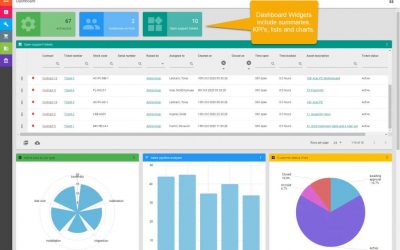
On top of the database sits a layer of business logic and automation: rules that reorder when stock drops below a threshold, workflows that route invoices for approval, alerts for overdue payments. Above that is the interface — increasingly browser-based — through which staff interact with the system. Modern web-technology systems such as Business Manager Enterprise (BME) run in any standard browser, so the same live data is available in the office, on site, or on a mobile device without installing software on every machine.
Types of ERP Systems
ERP is categorised three ways, and the right type depends on your size, sector, and how you want to deploy.
By Deployment Model
This is where buyers get caught, because vendors blur two separate decisions — where the software runs and how you pay for it — into one.
On-premise ERP runs on your own servers, giving maximum control and data ownership in exchange for in-house IT.
Cloud ERP is hosted by the vendor and rented, usually per user per month. Adoption has climbed fast — cloud ERP reached roughly 64% of deployments in 2024, up from about 44% in 2020 — but a subscription means your data, uptime, and ongoing cost sit with the provider, and the per-user model penalises you for growing.
Browser-based ERP is accessed through a standard web browser yet can be hosted in the cloud or self-hosted on your own infrastructure — the accessibility of the web without lock-in to a single hosting or licensing model. BME, for instance, is browser-based, can be deployed either way, and is licensed on a concurrent/perpetual basis rather than per-user subscription, so cost doesn’t scale punitively with headcount. (That deployment-plus-licensing freedom is a genuine differentiator and worth stating plainly — most vendors won’t.)
Hybrid ERP mixes on-premise and cloud, common in businesses mid-transition.
By Business Size
SMB ERP is built to be affordable and quick to implement — months, not years — with the modules a growing company actually uses. Enterprise-tier ERP (SAP, Oracle, Microsoft Dynamics, NetSuite dominate this end, with SAP holding roughly 22% of the market, Oracle around 12%, and Microsoft about 9%) carries the configuration depth, and the cost, of large multi-site, multi-currency operations.
By Industry
Generalist ERP suits most businesses across sectors. Industry-specific ERP is tailored to a particular trade — manufacturing, field service, wholesale distribution, and other sectors — with workflows and terminology built for that industry rather than retrofitted to it.
ERP vs Related Systems: Clearing Up the Confusion
ERP is routinely confused with neighbouring software categories. These borders matter when you’re evaluating options.
ERP vs CRM
CRM (Customer Relationship Management) runs the front office — leads, sales, customer interactions. ERP runs the back office — finance, inventory, operations — and usually includes CRM as a module. CRM is a part; ERP is the whole. A standalone CRM won’t run your accounts or your warehouse.
ERP vs MRP
MRP is ERP’s ancestor, built specifically to plan manufacturing materials. ERP grew out of MRP by adding finance, HR, and sales, so today MRP is typically one module inside ERP rather than a separate product.
ERP vs Accounting Software
Accounting software handles bookkeeping and financial reporting — and nothing else. ERP includes accounting but extends into inventory, manufacturing, sales, and operations. If you’ve outgrown your accounting tool and are duct-taping other apps around it, that’s the classic signal you’ve reached the integration tipping point.
ERP vs Business Management Software
The subtlest distinction. Business management software is the broad parent category for any software that runs business operations. ERP is a specific class of it — the integrated, single-database kind that unifies back-office functions. In everyday use the terms are treated as interchangeable, but ERP is the precise term for one connected system, while business management software is the wider umbrella that also covers point solutions. (Full landscape in our guide to what business management software is.)
Benefits of ERP
Implemented well, the advantages of ERP compound. The main benefits — and the merits that matter most — are:
A single source of truth. One trusted dataset, eliminating the conflicting spreadsheets and reconciliation work that drain time and breed errors. This is the foundational benefit; every other one depends on it.
Eliminated double entry. Data entered once flows through the system, removing both wasted hours and transcription mistakes.
Real-time visibility. Live financials, stock, and order status instead of stale end-of-month reports.
Measurable ROI. Independent research backs this up: Nucleus Research puts the median time to ROI at about 2.5 years, with well-run systems cutting operational costs by roughly 23%, and Panorama Consulting reports that 97% of organisations see improvements after a successful implementation.
Higher productivity. Automated workflows handle the repetitive steps — invoicing, reorders, approvals — freeing people for work that needs judgement.
Scalability. A modular ERP grows with the business; switch on functions and sites as needed instead of re-platforming.
Audit and compliance confidence. Consistent records and a clear audit trail make tax, reporting, and compliance far easier.
ERP Implementation: The Data Every Buyer Should See First
The benefits are real, but they are conditional — and the conditions are where most projects come apart. The numbers are sobering, and you should know them before you sign anything.
Across widely cited analyses, the ERP implementation failure rate sits between 50% and 75% — meaning most projects fall short of their original objectives. Gartner projects that by 2027, more than 70% of recently implemented ERP initiatives will fail to fully achieve their original business goals. Mint Jutras data shows roughly 55% of projects go over budget and 68% run longer than planned, with only about 61% meeting their original aims.
The cause is almost never the software. Gartner names poor data quality as the leading reason ERP projects fail, and around 62% of organisations cite data migration as their single biggest challenge. The most expensive mistake, repeated across the research, is treating ERP as a software purchase rather than a business-process change.
The practical lessons that separate the successful minority:
- Clean and audit your data before you scope migration — it is the number-one failure point, not an afterthought.
- Phase the rollout — most successful organisations go live module by module rather than “big bang”; SMB implementations done this way typically run 3–9 months.
- Pick a vendor whose system fits your existing processes closely, so you configure rather than heavily customise (custom code is what breaks on every future upgrade).
- Invest in training and change management — resistance from people, not limitations of technology, sinks more projects than anything else.
A well-scoped implementation with a vendor who understands your trade is the difference between an ERP that transforms operations and one that becomes expensive shelfware.
Who Uses ERP?
ERP began in large manufacturers but now spans every size and sector. Manufacturers plan production and materials with it; wholesalers and distributors manage multi-warehouse inventory and orders; field-service and trades businesses coordinate jobs, engineers, and billing; professional-services firms track project time and profitability; retailers and construction firms run on it too. What unites them isn’t size — it’s having crossed the integration tipping point, where reconciling disconnected systems by hand costs more than integrating them.
Frequently Asked Questions
What does ERP stand for?
ERP stands for Enterprise Resource Planning — software that integrates a company’s core operations (finance, inventory, manufacturing, sales, and HR) into one connected system built on a single shared database.
What is ERP in simple terms?
ERP is one software system that runs the whole business from a single database, so every department works from the same up-to-date information instead of separate, disconnected tools. Enter data once, and everyone who needs it sees it.
Is ERP the same as accounting software?
No. Accounting software only handles finances. ERP includes accounting but also manages inventory, sales, purchasing, manufacturing, and HR within the same system. Accounting is one module of ERP, not the whole of it.
Is ERP only for large companies?
No. ERP began in large manufacturers, but modern ERP systems are built for businesses of all sizes, including small and mid-sized companies. The real trigger for ERP is operational fragmentation, not headcount.
What is the difference between ERP and CRM?
CRM manages customer-facing activities like sales and contacts; ERP manages back-office operations like finance and inventory and usually includes CRM as one module. ERP is the broader system.
What is the difference between ERP and MRP?
MRP (Material Requirements Planning) plans the materials needed for manufacturing. ERP evolved from MRP by adding finance, HR, sales, and more, so MRP is now typically one module inside an ERP system.
How long does ERP implementation take, and why do so many fail?
SMB implementations typically run 3–9 months when phased; larger deployments take longer. Most failures trace to poor data quality and inadequate change management rather than the software itself — which is why cleaning your data and training your people early are the strongest predictors of success.
Bringing It Together
ERP — Enterprise Resource Planning — is the integrated software that runs a company’s core operations from one connected system instead of a patchwork of disconnected tools. It works by holding all operational data in a single database every module shares, which delivers the real prize: enter information once, and the whole business sees it. You need it the day fragmentation costs more than integration — the integration tipping point — regardless of your size.
ERP is a specific, powerful class within the wider world of business management software. If your business has crossed that tipping point, an integrated platform is the answer.
Business Manager Enterprise (BME) brings ERP, CRM, MRP, supply chain, warehouse management, HR, and fully integrated multi-currency accounting into one browser-based system — with the modules competitors charge extra for included as standard, and licensed without the per-user penalty of subscription ERP. Request a demonstration to see how it would run your business.